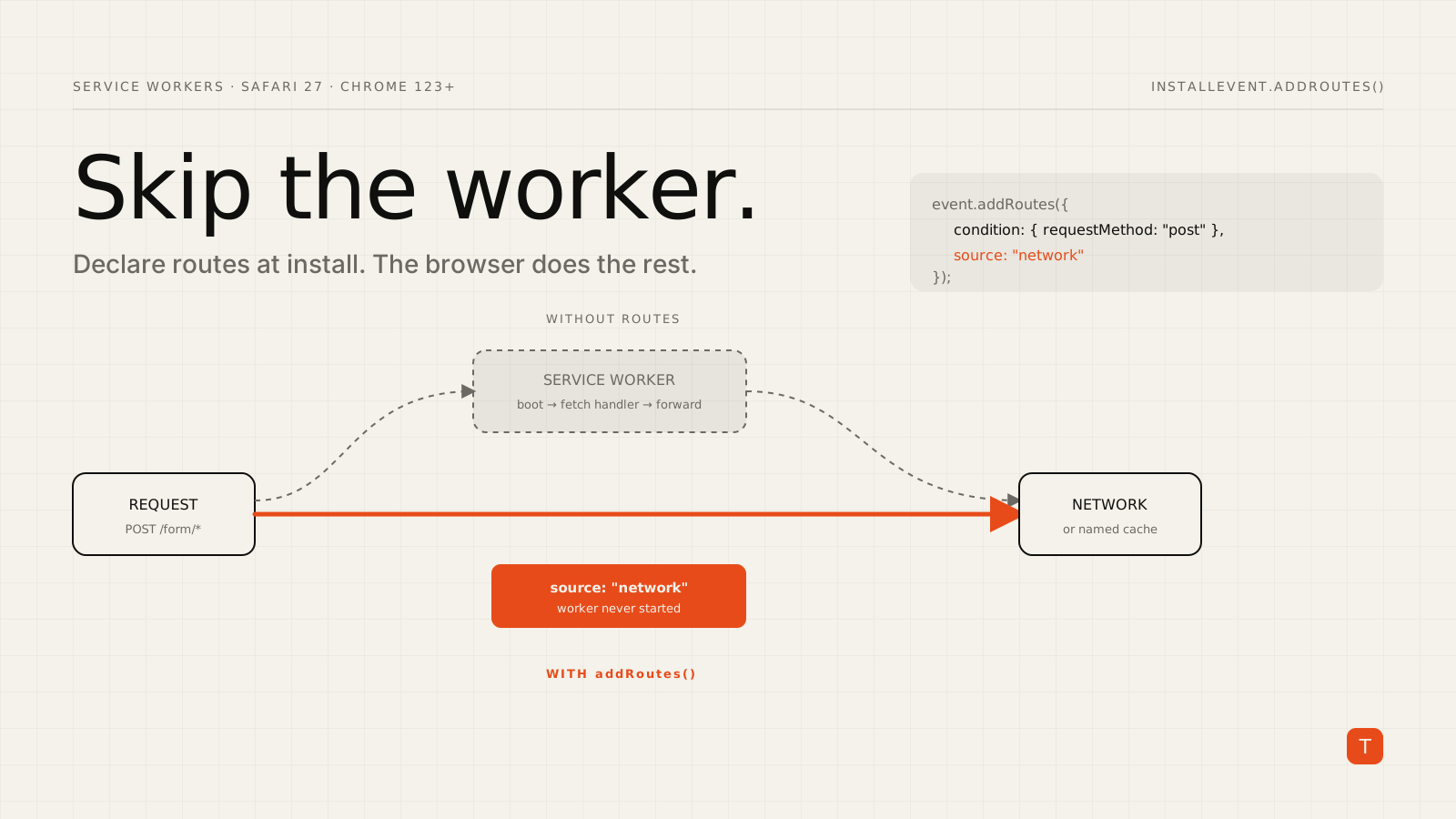
A service worker is a powerful thing to put between your page and the network. It is also a thing that has to be running before it can answer anything. If the worker is asleep when a navigation starts, the browser must boot it first, and for any request your fetch handler was going to pass straight through to the network, that boot was pure overhead.
The Service Worker static routing API exists to remove that overhead, and it just became far more useful. Safari 27.0, released on September 17, 2026, lists it among its features, describing it as a way to reduce overhead for high-performance PWAs by skipping the service worker for matching requests. Chrome shipped the API in version 123. With Safari joining, the pattern is worth a serious look for any site that registers a service worker.
The problem: the worker is in the critical path
Without static routing, every request in scope goes to your service worker's fetch handler. That is fine when the handler does real work, such as serving an offline shell from cache. It is wasteful when the handler's answer is "just fetch it from the network," which is the case for a large share of requests on many sites: API calls, form posts, analytics beacons, and anything you deliberately never cache.
The browser cannot know that in advance. It has to start the worker and run your code to find out. Static routing lets you tell the browser the answer ahead of time.
How it works
You call addRoutes() on the InstallEvent, inside your service worker's install listener. Each rule has a condition (what to match) and a source (where to load matching requests from). According to the MDN reference, these rules apply even before the service worker starts, which is the whole point.
// sw.js
addEventListener("install", (event) => {
  event.addRoutes([
    {
      // Form submissions never need the worker
      condition: { urlPattern: "/form/*", requestMethod: "post" },
      source: "network",
    },
    {
      // Images come straight from a named cache
      condition: { urlPattern: "*.png", requestMethod: "get" },
      source: { cacheName: "pictures" },
    },
  ]);
});
A request that matches the first rule goes directly to the network. The service worker is not consulted and does not need to be started. A request that matches no rule falls through to your fetch handler as before, so adopting the API is incremental: you can start with one obvious rule and add more.
Conditions you can match on
A rule's condition can combine the following properties, and a request must satisfy all of the ones you list:
urlPattern: aURLPatternor a pattern string. Regular expression capture groups are not allowed.requestMethod,requestMode, andrequestDestination: match on the method, the request mode such assame-originorcors, and the destination such asdocument,script, orworker.runningStatus:"running"or"not-running", which lets a rule depend on whether the worker is already awake.orandnot: combinators.ortakes an array of condition objects and cannot be combined with other condition types in the same object, so to add a shared requirement such asrequestMethod: "get"you repeat it in separate rules, as in the example above.
Sources you can route to
The source can be "network", "cache", a specific { cacheName: "..." }, "fetch-event" (hand it to your handler), or "race-network-and-fetch-handler", which asks the network and the handler at the same time and uses whichever answers first. If you name a cache that does not exist, the browser falls back to the network. Using "fetch-event" when the worker has no fetch handler throws a TypeError.
The most useful trick: only wake the worker when it is already awake
The runningStatus condition enables a pattern that is easy to reason about. For content pages where your handler adds value only if it is quick, you can say "use the network if the worker is not running":
addEventListener("install", (event) => {
  event.addRoutes({
    condition: {
      urlPattern: "/articles/*",
      runningStatus: "not-running",
    },
    source: "network",
  });
});
If the worker is cold, the navigation does not wait for it to boot. If it is already running, the request goes through your fetch handler as usual. You keep the benefit of your caching logic when it is cheap to use and skip the startup tax when it is not.
The race source is the other option for navigations where you are unsure which path will win. Be deliberate with it: racing means you may issue a network request you did not strictly need, so it suits resources where a duplicate request is cheap.
Practical guidance for adopting it
Measure first. Neither the Chrome article nor the MDN page publishes benchmark numbers for the savings, so do not assume a figure. Compare navigation and request timings in field data before and after, particularly for cold starts, since that is where the benefit shows up.
Start with requests that should never touch the worker. Non-GET requests, API endpoints, and third-party calls are the safest first rules because you already know your handler forwards them.
Keep the handler as the fallback. Routes are an optimization layer. Anything unmatched still reaches fetch, so your offline and caching behavior stays intact.
Check your rules in DevTools. In Chrome, registered rules appear in the Service Worker section of the Application panel, and the Network panel's size column indicates when a request matched a rule.
Feature-detect. The API is not yet Baseline according to MDN, so guard the call and let the handler cover browsers without it:
addEventListener("install", (event) => {
  if (typeof event.addRoutes === "function") {
    event.addRoutes([
      { condition: { requestMethod: "post" }, source: "network" },
    ]);
  }
});
Because unmatched requests fall through to fetch, browsers without support simply behave as they do today.
Takeaways
The API is small, declarative, and safe to adopt gradually. If your site has a service worker, here is a short plan:
- List the request types your
fetchhandler forwards untouched: POSTs, API calls, uncacheable resources. - Add
networkroutes for them in yourinstalllistener, guarded by feature detection. - Consider a
runningStatus: "not-running"route for content pages where a cold worker should not block navigation. - Compare field timings for cold-start navigations before and after.
With Safari 27 now supporting it alongside Chrome, this is a rare performance change that is mostly deleting work: the fastest service worker is the one the browser never has to start.