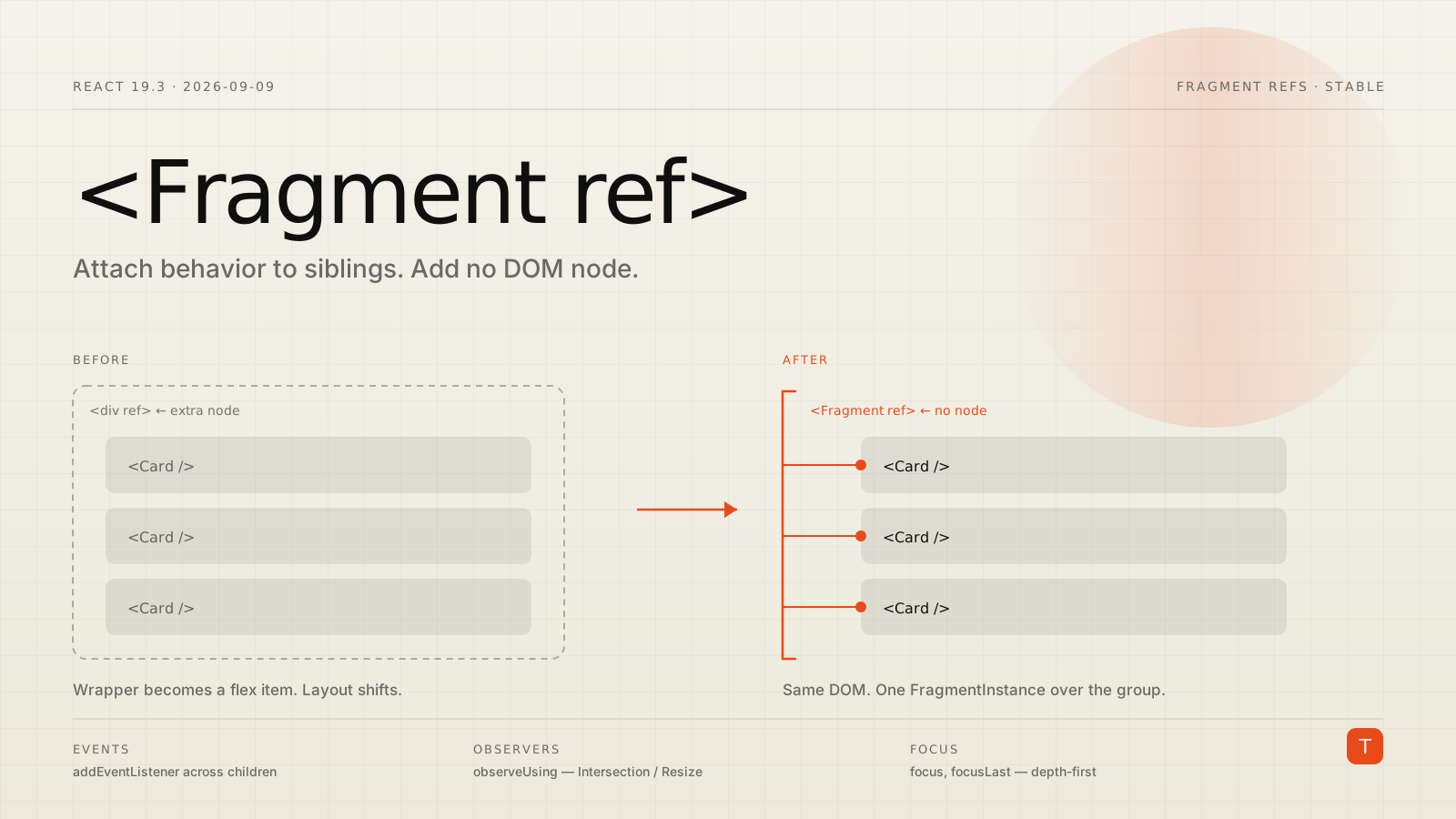
There is a <div> in your codebase that exists for no reason other than to hold a ref. It has no class, no semantics, and no business being in the accessibility tree. It is there because you needed an IntersectionObserver on three sibling cards, and a ref has to attach to something.
Then someone put that div inside a flex container and everything moved.
React 19.3, released on September 9, 2026, makes Fragment Refs stable. You can now pass a ref to a <Fragment> and get back a FragmentInstance that operates on the fragment's DOM children as a group — without producing a DOM node of its own.
import { Fragment, useRef, useEffect } from 'react';

function Component() {
  const fragmentRef = useRef(null);

  useEffect(() => {
    fragmentRef.current.focus();
  }, []);

  return (
    <Fragment ref={fragmentRef}>
      {posts.map(post => (
        <Heading key={post.id}>{post.title}</Heading>
      ))}
    </Fragment>
  );
}
Note the explicit <Fragment>. Like key, ref does not work with the <>...</> shorthand — you have to import Fragment from react.
The two problems this solves
The first is the one everybody recognizes: a component renders a group of siblings with no single parent. Wrapping them changes layout. Under display: flex or display: grid, an extra element is not neutral — it becomes a flex item, it collapses your gap behavior, and it breaks :nth-child() selectors that were counting on a flat list.
The second is quieter and more annoying: the component doesn't forward its ref prop. If <Card> comes from a design system you don't control, you cannot get a handle on its DOM node. Your options were to fork it, wrap it, or file a PR and wait a quarter.
Fragment Refs sidestep both. The FragmentInstance reaches through React components to find the DOM nodes underneath, regardless of whether those components cooperate.
What a FragmentInstance gives you
It is deliberately a small, fixed surface — not a DOM element. From the <Fragment> reference:
addEventListener,removeEventListener,dispatchEvent— event handling across the childrenfocus,focusLast,blur— focus managementobserveUsing,unobserveUsing— attach anIntersectionObserverorResizeObservergetClientRects,getRootNode,compareDocumentPosition,scrollIntoView— measurement and scrolling
You cannot read innerHTML, set styles, or mutate the tree. That constraint is the point: Fragment Refs let you attach behavior to a subtree without granting the ability to restructure it.
Which children does it actually target?
This is the detail that will bite you if you skip it. Consider:
<Fragment ref={ref}>
  <div id="A" />
  <Wrapper>
    <div id="B">
      <div id="C" />
    </div>
  </Wrapper>
  <div id="D" />
</Fragment>
The targeted children are A, B, and D. Wrapper is a React component, so React looks through it to find the DOM node underneath. C is not targeted — it sits inside the DOM element B, so it is second-level.
The rule: methods like addEventListener, observeUsing and getClientRects operate on first-level host (DOM) children.
focus and focusLast are the explicit exception. They search all nested children depth-first for something focusable. So in a form fragment, focus() will find an <input> buried inside a <fieldset> inside a <label> — which is exactly the behavior you want for focus management and would be wrong for event delegation.
Where this changes real code
Observers without ref-drilling
The old pattern for "tell me when this group of cards is visible" required either a wrapper element or threading a ref callback down through every child component. Now:
function VisibleGroup({ onVisibilityChange, children }) {
  const fragmentRef = useRef(null);

  useLayoutEffect(() => {
    const visible = new Set();
    const observer = new IntersectionObserver(entries => {
      entries.forEach(e => {
        e.isIntersecting ? visible.add(e.target) : visible.delete(e.target);
      });
      onVisibilityChange(visible.size > 0);
    });

    const instance = fragmentRef.current;
    instance.observeUsing(observer);
    return () => instance.unobserveUsing(observer);
  }, [onVisibilityChange]);

  return <Fragment ref={fragmentRef}>{children}</Fragment>;
}
<VisibleGroup> adds zero DOM. Its children need to expose nothing. This is the shape that lazy-loading, impression tracking and scroll-spy components have wanted for years.
Event listeners on a group
useEffect(() => {
  const instance = fragmentRef.current;
  if (instance === null) return;

  instance.addEventListener('click', onClick);
  return () => instance.removeEventListener('click', onClick);
}, [onClick]);
The listener is applied to every first-level DOM child. When children are added or removed dynamically, the FragmentInstance adds and removes the listener for you — no re-running the effect, no stale-node leak.
Focus management that survives refactors
Focus handling in dialogs, menus and multi-step forms is usually a pile of refs on specific elements, and it breaks the moment someone reorders the markup. focus() and focusLast() on a fragment are positional rather than identity-based: first focusable thing, last focusable thing. Reordering the fields doesn't invalidate the code.
The shared-observer pattern
Sites that observe hundreds of elements usually converge on one optimization: a single IntersectionObserver per configuration, with entries routed to the right callback. Creating one observer per component is measurably worse.
Fragment Refs support this through a property called reactFragments. Every first-level DOM child of a fragment that has a ref gets a reactFragments property — a Set<FragmentInstance> of every fragment instance that owns that element. When your shared observer fires, you use it to look up which fragment the intersecting element belongs to and dispatch accordingly.
It is niche, but it means the ergonomic API and the fast API are the same API. You don't have to abandon Fragment Refs when you hit scale.
Gotchas before you ship
No shorthand syntax. <>...</> cannot take a ref, same as it cannot take a key. Import Fragment explicitly.
observeUsing does not work on text nodes. React logs a development warning if the fragment contains only text children. A ResizeObserver on a bare string is a no-op, silently, in production.
scrollIntoView has a different signature than the DOM method. It takes an optional alignToTop boolean, not a ScrollIntoViewOptions object — passing one throws. true (the default) aligns the first child to the top; false aligns the last child to the bottom. Muscle memory from element.scrollIntoView({ behavior: 'smooth' }) will throw an error here.
Hidden <Activity> trees don't get listeners. React does not apply listeners added via addEventListener inside a hidden <Activity> boundary. They are applied automatically when it becomes visible. Reasonable behavior, surprising the first time you debug it.
Empty fragments have fallback behavior. With no children, scrollIntoView scrolls the nearest sibling or parent instead. compareDocumentPosition returns DOCUMENT_POSITION_IMPLEMENTATION_SPECIFIC for empty fragments and for children rendered through a portal.
Takeaways
- React 19.3 (2026-09-09) makes Fragment Refs and
<ViewTransition>stable. Fragment Refs are the lower-profile change and the one more likely to touch code you already maintain. - The API targets first-level DOM children — except
focus/focusLast, which search depth-first. Getting this backwards is the most likely source of bugs. - The real unlock is attaching behavior to components you don't own. No fork, no wrapper, no upstream PR.
- Audit for wrapper elements whose only job is holding a ref. In a flex or grid layout, those are the ones that have been quietly costing you.
- Reach for
reactFragmentsonly when you are sharing one observer across many groups.
If you maintain a component library, the practical move is a grep for useRef in list and group components, and for divs with no class and no semantic role. On most teams that is a short afternoon and a smaller DOM.
Full details in the React 19.3 release post, the <Fragment> API reference, and the v19.3.0 release notes on GitHub.