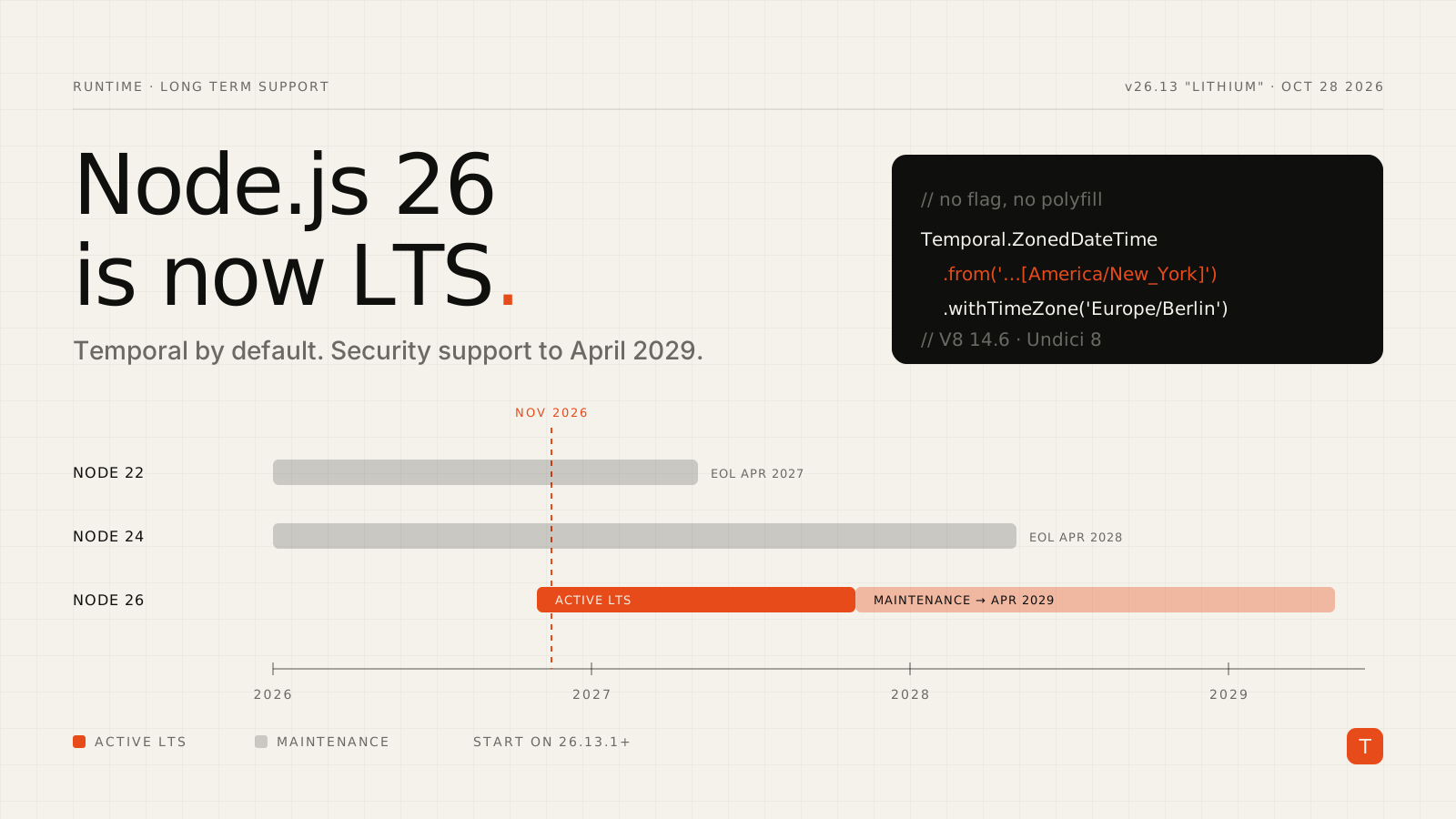
If your production servers, CI images, and serverless functions are pinned to Node.js 24, the clock just moved. On October 28, 2026, Node.js 26.13.0 "Lithium" entered Long Term Support, with security support running through the end of April 2029. A week earlier, Node 24 left Active LTS and moved into maintenance mode, according to the endoflife.date Node.js tracker.
Node 26 is also the last release line under the old odd/even schedule — the project is moving to one major release per year. For teams that only upgrade on LTS boundaries, this is the version you'll live with for a while, so it's worth doing deliberately.
Where every supported line stands
As of mid-November 2026, the supported lines look like this (dates from endoflife.date):
| Line | Status | Security support ends |
|---|---|---|
| Node 26 | Active LTS | April 30, 2029 |
| Node 24 | Maintenance LTS | April 30, 2028 |
| Node 22 | Maintenance LTS | April 30, 2027 |
| Node 20 | End of life | April 30, 2026 |
Two takeaways. If you are still on Node 20, you've been running without security patches since the spring — that's the urgent upgrade. If you're on 22, you have about five months of runway left; skipping straight to 26 is the sensible move. Teams on 24 aren't in danger, but maintenance mode means fewer backports, so plan the move rather than letting it drift.
What actually changed in Node 26
The full list is in the Node.js 26.0.0 release notes. The changes most teams will notice:
Temporal is on by default
The headline feature: the Temporal API no longer needs an experimental flag. Temporal replaces the long list of Date pitfalls — mutable objects, zero-indexed months, no real time zone support — with immutable types that separate "a point in time" from "a date on a calendar" from "a wall-clock time in a specific zone."
// No flag, no polyfill on Node 26
const meeting = Temporal.ZonedDateTime.from(
  '2026-11-20T09:00[America/New_York]'
);

const inBerlin = meeting.withTimeZone('Europe/Berlin');
console.log(inBerlin.toString());
// 2026-11-20T15:00:00+01:00[Europe/Berlin]

const today = Temporal.Now.plainDateISO();
const eol = Temporal.PlainDate.from('2027-04-30');
console.log(today.until(eol, { largestUnit: 'days' }).days);
If your codebase pulls in @js-temporal/polyfill or a date library mainly to do time zone math, Node 26 lets you start retiring that dependency on the server. Just keep in mind that browser support is a separate question — shared isomorphic code may still need the polyfill on the client.
V8 14.6: upsert and iterator concat
Node 26 ships V8 14.6, which brings two small but handy language additions. The "upsert" methods remove the classic get-check-set dance on Map and WeakMap:
const byTenant = new Map();

// Before
if (!byTenant.has(id)) byTenant.set(id, []);
byTenant.get(id).push(event);

// Node 26
byTenant.getOrInsert(id, []).push(event);

// Lazy default — the callback only runs on a miss
cache.getOrInsertComputed(key, (k) => expensiveLookup(k));
And Iterator.concat() chains iterables lazily without spreading them into a temporary array:
for (const row of Iterator.concat(primaryRows, replicaRows)) {
  process(row);
}
Undici 8 under fetch()
The built-in fetch() is powered by Undici, which jumps to the 8.x line in Node 26. For most code this is invisible. If you import undici directly for its lower-level Agent, Pool, or interceptors, check its changelog alongside the runtime upgrade.
The breaking changes to check first
Most applications upgrade cleanly, but the following removals and deprecations from the 26.0.0 release are the ones that tend to show up in older code and dependencies:
http.Server.prototype.writeHeader()is gone. It was a long-deprecated alias. Useres.writeHead().- The legacy
_stream_*modules are removed —_stream_readable,_stream_writable,_stream_duplex,_stream_transform,_stream_passthrough, and_stream_wrap. Import fromnode:streaminstead. These mostly appear inside old, unmaintained packages, so search yournode_modules, not just your own source. --experimental-transform-typeswas removed. Built-in type stripping still runs erasable TypeScript, but if you relied on this flag for enums or namespaces, you'll need a real build step (or to rewrite those constructs).module.register()is now runtime-deprecated. Custom loaders built on it will print warnings; plan a migration to the synchronousmodule.registerHooks()API.NODE_MODULE_VERSIONis now 147. Native add-ons compiled against the old ABI won't load. Packages built on Node-API are ABI-stable and unaffected; anything else needs a rebuild or a new prebuilt binary.localStoragereturnsundefinedunless a storage file is configured. If any shared code feature-detectslocalStorageon the server, verify it still takes the right branch.
A quick way to find the low-hanging problems before you touch CI:
# Old stream internals and writeHeader in your code and deps
grep -rnE "require\(['\"]_stream_|writeHeader\(" src node_modules \
  --include=*.js --include=*.cjs --include=*.mjs | head -50

# Run your test suite with deprecations surfaced as errors
NODE_OPTIONS="--throw-deprecation" npm test
Patch level matters: start on 26.13.1 or later
Don't pin to the exact LTS-transition build. On November 11, 2026, the project shipped Node.js 26.13.1, a security release fixing multiple high-severity issues in HTTP/2 and TLS handling, along with dependency updates to Brotli, llhttp, SQLite, and Undici. Public-facing servers using node:http2 or node:tls should treat this as required. Node 24 and Node 22 received patched releases the same day, so if you can't upgrade majors yet, at least move to the latest patch on your current line.
A rollout plan that works
- Bump the version everywhere at once.
.nvmrc/.node-version, theenginesfield inpackage.json, Dockerfile base images, CI matrices, and your serverless runtime setting. Mismatches between local and CI are where "works on my machine" bugs come from. - Rebuild native dependencies. Delete
node_modules, reinstall, and runnpm rebuildif you vendor anything compiled. - Run tests with
--throw-deprecation. It turns quiet warnings — includingmodule.register()— into failures you can't ignore. - Canary before you cut over. Send a slice of production traffic to Node 26 instances and compare error rates, p95 latency, and memory before shifting the rest. GC and JIT changes in a new V8 can move memory profiles in either direction.
- Adopt Temporal gradually. Start with new code paths that do time zone or duration math; don't rewrite working
Datecode just because you can.
Takeaways
Node.js 26 is now the default choice for new projects and the target for any upgrade still sitting on 20 or 22. The breaking changes are narrow — mostly long-deprecated APIs and native add-on rebuilds — and the payoff is Temporal without a polyfill, a newer V8, and three-plus years of security support. Start on 26.13.1 or later, align versions across every environment, run your suite with deprecations as errors, and canary the rollout. That's an afternoon of work for most services, and it buys you runway until 2029.