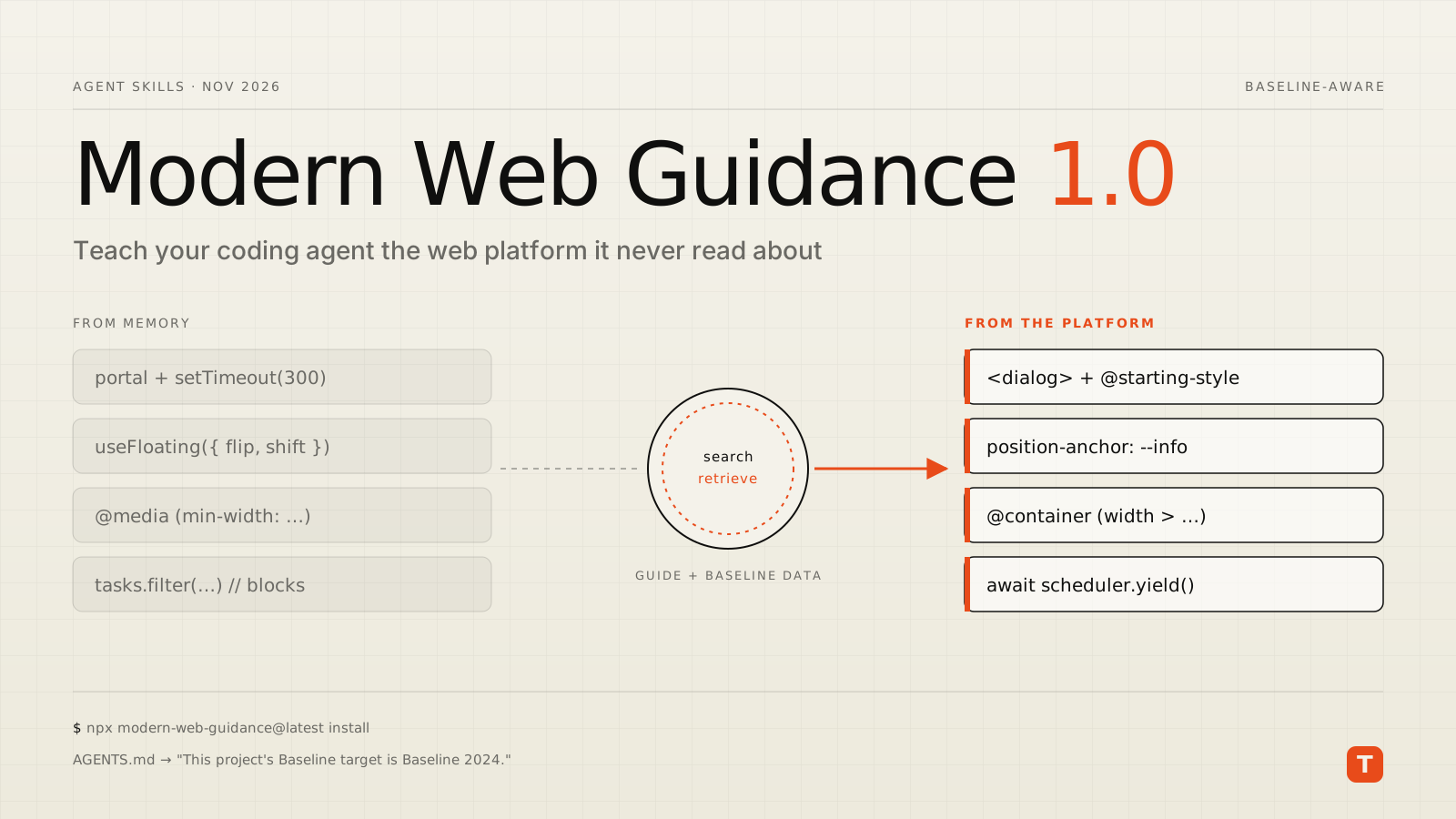
Ask a coding agent for an animated modal and there is a good chance you get a portal, a shouldRender flag, and a setTimeout whose duration has to be kept in sync with a CSS transition by hand. Ask for a tooltip and you may get a positioning library. None of that is wrong exactly. It is just what the web looked like in the agent's training data, and the platform has moved on.
That gap is what Modern Web Guidance is meant to close. On November 10, 2026, the Chrome team announced version 1.0, moving the project out of preview. This post covers what it is, what changed in 1.0, and how to set it up so it helps rather than surprises you.
What Modern Web Guidance is
Modern Web Guidance is a pack of agent skills plus a small CLI. When an agent is working on a frontend task, it searches a database of guides for the relevant use case, pulls the matching guide into its context, and writes code from that guide rather than from memory. Each guide carries code patterns, gotchas, fallbacks, and browser compatibility data drawn from Baseline.
The guides are grouped by area: CSS, forms, JavaScript, performance, security, UI behaviors and more. Examples in the GitHub repository include a navigation drawer that closes on swipe, outside tap or Escape; keeping aria-invalid in sync with the :user-invalid state; and signing in a returning user with a passkey. The project is Apache-2.0 licensed, and according to the announcement, Microsoft Edge has joined as a cross-browser partner.
What is new in 1.0
The 1.0 announcement lists four main changes:
- A modernization workflow. You can point the agent at an existing codebase and ask it to find safe opportunities to modernize. The first release uses static analysis over a limited set of patterns; agent-driven audits are planned.
- A larger guide database, covering what the team describes as hundreds of verified gaps in what AI models know about the web, with cross-browser solutions.
- Stricter review. Each guide is signed off by tech leads for its content area, and user-facing guides also get accessibility review, including testing by assistive technology experts.
- Public evals that compare agents with and without the guidance.
The announcement also includes case studies from early adopters. One team (note inc.) reports pass rates on modern web checks rising from 61% to 94% across a 180-run evaluation. Another, MetaMask, ran it as a review bot over roughly 480 pull requests in five weeks; it commented on 64, and engineers fixed 43 of those findings. Those are vendor-reported numbers from the people building and promoting the tool, so treat them as a signal worth testing on your own code, not as a guarantee.
What it changes in practice
A useful illustration comes from a LogRocket walkthrough that ran the same prompts with and without the guidance. With it, the agent chose a native <dialog>, container queries, CSS anchor positioning and scheduler.yield() over a custom modal, viewport media queries, a floating-UI library and a long synchronous filter.
Here is what the modern versions look like. The modal animation needs no JavaScript timer at all, because @starting-style and allow-discrete let CSS animate both entry and exit from the top layer:
dialog {
  opacity: 0;
  transition:
    opacity 0.2s ease,
    overlay 0.2s ease allow-discrete,
    display 0.2s ease allow-discrete;
}

dialog[open] {
  opacity: 1;
}

@starting-style {
  dialog[open] {
    opacity: 0;
  }
}
Your JavaScript shrinks to dialog.showModal() and dialog.close(), and the browser handles focus trapping, Escape to close, and the inert background.
The tooltip becomes a few declarations instead of a dependency:
.info-icon {
  anchor-name: --info;
}

.tooltip {
  position: absolute;
  position-anchor: --info;
  position-area: top;
  position-try-fallbacks: flip-block;
}
And a long-running loop that used to block input can hand control back to the browser between chunks, with a fallback where scheduler.yield() is not available:
function yieldToMain() {
  if (globalThis.scheduler?.yield) {
    return scheduler.yield();
  }
  return new Promise((resolve) => setTimeout(resolve, 0));
}

async function filterTasks(tasks, query) {
  const results = [];
  for (let i = 0; i < tasks.length; i++) {
    if (tasks[i].title.includes(query)) results.push(tasks[i]);
    if (i % 50 === 49) await yieldToMain();
  }
  return results;
}
None of these patterns are new to people who follow the platform closely. The point is that an agent without current guidance rarely reaches for them unprompted, and every legacy pattern it writes becomes code your team maintains, ships to users, and pays for in bundle size and interaction latency.
Installing it
The getting started guide recommends running the installer from your project directory:
npx modern-web-guidance@latest install
If you installed a preview release, update with:
npx modern-web-guidance@latest update
There are also native install paths for most agents. For Claude Code, for example:
claude plugin install modern-web-guidance@claude-plugins-official
Codex, Copilot CLI, Gemini CLI, Antigravity, WebStorm and several others are covered in the same guide. You can also query the guides directly, which is a quick way to see what your agent will be reading:
npx modern-web-guidance@latest search "animate a dialog modal backdrop"
npx modern-web-guidance@latest retrieve "animate-to-from-top-layer"
search returns JSON with matching guide IDs and descriptions; retrieve prints the guide as Markdown.
Set your Baseline target first
This is the step most teams will skip, and the one that matters most. Without a target, the guidance defaults to Baseline Widely available, meaning features that have been interoperable across the major browsers for at least 30 months. That is a safe default, but it may be more conservative than your product needs, or not conservative enough if you support older embedded browsers.
Declare your target in the instruction file your agent already reads:
<!-- AGENTS.md or CLAUDE.md -->
This project's Baseline target is Baseline 2024.
Now the agent can tell when a feature like anchor positioning fits your support policy outright and when it needs progressive enhancement or a fallback. Two kinds of guidance stay off unless you opt in: features that have shipped in only one browser engine (the project calls them "volatile") and origin trials. Enable them per project with set-allow-volatile-features and set-allow-origin-trials only if you have a plan for when those APIs change.
Running the modernization workflow
For existing code, 1.0 adds a slash command you can run inside a supported agent:
/modern-web-guidance Modernize the code in this directory
Treat it like any automated refactor. Run it on a branch, scope it to one directory at a time, and review the diff with the same care you would give a human pull request. Removing a polyfill or a positioning library is only a win if your support matrix, design system and accessibility requirements all agree. As the LogRocket article points out, native elements still need keyboard, focus and screen reader testing, and some libraries remain the right choice for wider support or mature accessibility handling.
Takeaways
- Install it where your agents already work. One
npxcommand, or your agent's plugin marketplace, is enough to start. - Write your Baseline target into
AGENTS.mdorCLAUDE.mdbefore anything else. Without it, the agent is guessing at your browser support policy. - Use
searchandretrieveyourself. Reading the guide an agent will follow is the fastest way to judge whether its output is correct. - Run the modernization workflow on a branch, one area at a time, and measure what changes: bundle size, dependency count, and INP in field data.
- Keep review and testing in the loop. Better defaults reduce cleanup work. They do not replace code review or real browser testing.
If your team is leaning on coding agents for frontend work, this is one of the cheapest quality improvements available right now. The agent writes the code either way; Modern Web Guidance gives it a current reference to write it from.