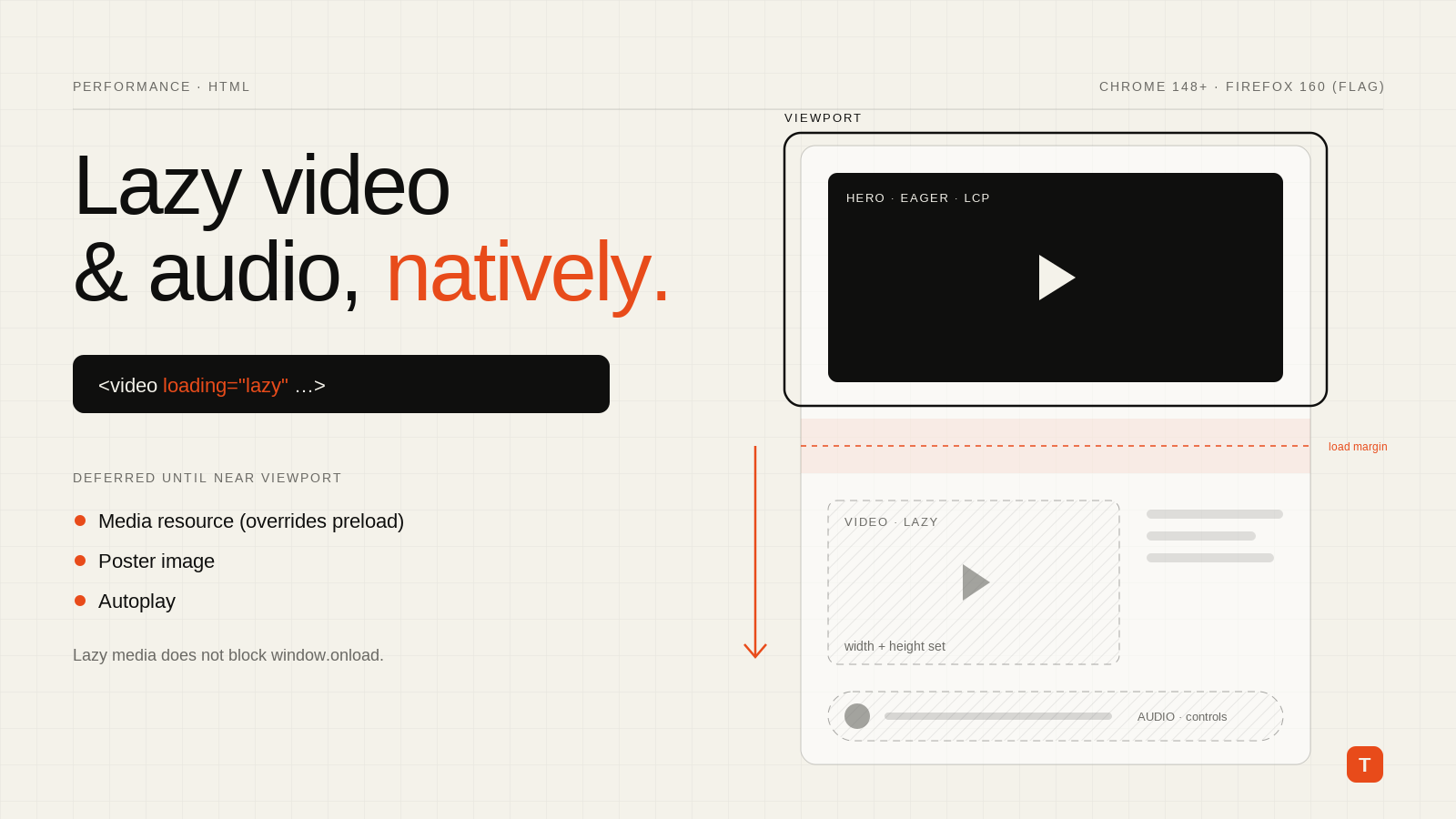
For years, native lazy loading stopped at <img> and <iframe>. If you wanted a below-the-fold product video or a podcast player to stay off the network until someone scrolled to it, you wrote an IntersectionObserver wrapper, swapped data-src attributes around, and hoped nobody forgot the poster image. That workaround is finally on its way out.
Chrome 148 added the loading attribute to <video> and <audio>, matching the behavior images and iframes already have. And Firefox 160, released on November 10, 2026, ships the same feature as an experimental feature behind the media.lazy_loading.enabled preference. WebKit has also signaled support. With a second engine now testing it, this is a good moment to add it to your media markup properly, because a few details work differently from lazy images.
What loading="lazy" defers on media
The syntax is what you would expect:
<video
  src="/media/product-tour.mp4"
  poster="/media/product-tour.jpg"
  width="1280"
  height="720"
  controls
  preload="metadata"
  loading="lazy">
</video>
According to the Chromium Intent to Ship and Firefox's release notes, a lazy media element defers three things until it gets close to the viewport:
- The media resource itself.
loading="lazy"takes precedence overpreload, so evenpreload="auto"won't start a download for an offscreen element. - The poster image. On
<video>, theposterfetch is deferred too. With lazy images this is the only request, but for video it is often the largest request that loads early. - Autoplay.
autoplayis queued until the element enters the viewport, so a muted looping background clip no longer starts decoding while it's three screens down.
The distance at which loading kicks in is chosen by the browser. Chromium describes its viewport margins as network-aware, adjusting for connection speed, and gives no fixed pixel value, so don't build anything that depends on an exact threshold.
There is one more behavior change worth knowing about: lazy media does not block window.onload. If you have analytics, visual tests or "page ready" logic that waits for the load event and assumes every video on the page has initialized, that assumption no longer holds once you add the attribute.
Two rules that keep lazy media from never loading
Lazy loading depends on the browser being able to tell when the element is near the viewport. Google's Modern Web Guidance entry on lazy video and audio points out two ways that check can fail.
1. Give every lazy <video> explicit dimensions
A video that hasn't loaded its metadata has no intrinsic size, so it falls back to the default 300×150 box. If your CSS collapses or hides that box, for example a wrapper with height: 0 waiting for content, the element may never intersect the viewport and the video never loads. Set integer width and height attributes. They also reserve layout space and prevent the CLS hit you get when a video pops in at full size:
video {
  width: 100%;
  height: auto; /* keeps the aspect ratio from width/height attributes */
}
2. Always add controls to a lazy <audio>
An <audio> element without controls doesn't render anything, so there is nothing to scroll into view. The guidance is explicit that <audio loading="lazy"> without controls will never load or autoplay. If you use a custom player UI, keep that in mind before adding the attribute to a hidden audio element. In that case, triggering load() from your own UI is the better pattern.
<figure>
  <audio controls preload="metadata" loading="lazy" src="/media/episode-42.mp3"></audio>
  <figcaption>Episode 42: Shipping performance budgets</figcaption>
</figure>
Don't lazy-load your LCP video
This is the same trap teams fell into with loading="lazy" on hero images. If a video, or its poster frame, is likely to be the Largest Contentful Paint element, lazy loading delays both the poster and the media fetch, and LCP gets worse. Leave the attribute off anything in the first viewport. The default is eager, so above-the-fold media needs no changes:
<!-- Hero: eager by default, poster is likely the LCP candidate -->
<video src="/media/hero.mp4" poster="/media/hero.avif"
       width="1600" height="900" autoplay muted loop playsinline></video>

<!-- Further down the page: lazy -->
<video src="/media/feature-demo.mp4" poster="/media/feature-demo.avif"
       width="1280" height="720" autoplay muted loop playsinline
       loading="lazy"></video>
If your CMS renders the same component in both positions, make loading a prop and set it based on where the block is placed, the same way you probably already handle fetchpriority and loading for images.
Rolling it out across browsers
Browsers that don't recognize the attribute simply ignore it, so adding loading="lazy" is safe today. What you get in those browsers depends on your other attributes. Pairing loading="lazy" with preload="none" or preload="metadata" means non-supporting browsers still avoid a full download, although they will fetch the poster and metadata eagerly. For most sites, that progressive-enhancement baseline is enough.
If the poster weight matters, for example on a gallery page with a dozen video cards, you can move poster and src into data- attributes and restore them with a small script. Where native support exists, the script copies the attributes back immediately and lets the browser do the lazy loading. Everywhere else it falls back to IntersectionObserver:
<video data-src="/media/card-1.mp4" data-poster="/media/card-1.avif"
       width="640" height="360" controls preload="none" loading="lazy"></video>
const lazyMedia = document.querySelectorAll('video[data-src], audio[data-src]');

function hydrate(media) {
  if (media.dataset.poster) media.poster = media.dataset.poster;
  media.src = media.dataset.src;
}

if ('loading' in HTMLMediaElement.prototype) {
  // Native support: the browser still defers because loading="lazy" is set.
  lazyMedia.forEach(hydrate);
} else {
  const io = new IntersectionObserver((entries, observer) => {
    for (const entry of entries) {
      if (!entry.isIntersecting) continue;
      hydrate(entry.target);
      observer.unobserve(entry.target);
    }
  }, { rootMargin: '200px 0px' });

  lazyMedia.forEach((el) => io.observe(el));
}
The trade-off is that this media now depends on JavaScript to load at all, so add a <noscript> fallback if that matters for your audience. The 200px margin is an arbitrary example value; tune it to your layout. For pages with only one or two videos, skip all of this and accept the eager poster fetch in older engines.
Two more things to check during rollout:
- Respect reduced motion. Lazy autoplay delays when a loop starts. It doesn't decide whether it should start. Keep honoring
prefers-reduced-motionbefore autoplaying decorative video. - No JavaScript, no deferral. Like lazy images, browsers only defer lazy media when scripting is enabled. Pages viewed with JS disabled load eagerly, which is the safe default.
Measuring the win
The impact shows up in the places you'd expect: fewer bytes transferred on initial load, fewer competing requests while the LCP resource downloads, and less main-thread decode work for autoplaying clips the user hasn't reached. Before and after enabling the attribute, compare a page with several below-the-fold videos using the Network panel filtered to media, and look at total transferred bytes and the LCP sub-parts in a Performance trace. In the field, watch LCP and your bandwidth bill for media-heavy templates. Since onload no longer waits for lazy media, don't use load-event timing as your success metric.
Takeaways
- Add
loading="lazy"to<video>and<audio>elements below the fold. It defers the media, the poster and autoplay in Chrome, and Firefox 160 is testing the same behavior behindmedia.lazy_loading.enabled. - Never use it on a video that might be your LCP element.
- Give lazy videos explicit
widthandheight, and give lazy audiocontrols, or they may never load. - Pair it with
preload="none"orpreload="metadata"so browsers without support still avoid full downloads. - Update anything that relies on
window.onloadto mean "all media is ready." - Only add a JavaScript fallback if eager poster downloads are a measurable cost on your pages.
If your site has media-heavy landing pages and you want help auditing which videos are hurting LCP or wasting bandwidth, get in touch. This is the kind of quick, measurable performance work we do regularly.