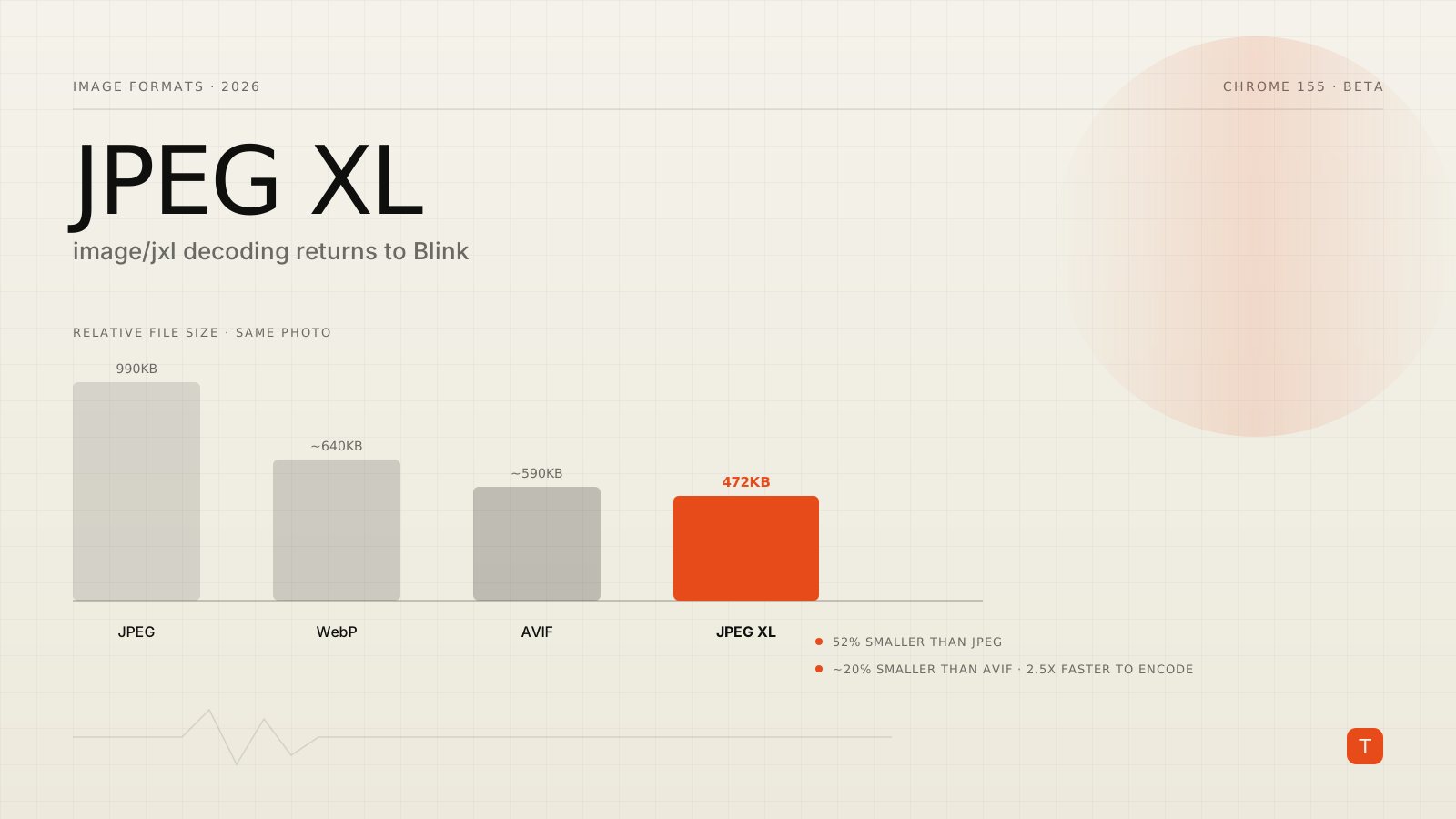
Chrome 155, currently in beta, ships something that would have seemed unlikely two years ago: native decoding support for JPEG XL. The Chrome 155 beta announcement describes it plainly — support for decoding image/jxl images in Blink using jxl-rs, a memory-safe, pure-Rust implementation of the codec. That's a notable reversal. Google removed JPEG XL from Chromium back in version 110, in October 2022, and spent the next three years fielding public criticism for the decision.
If you write image-handling code, or you've ever picked AVIF over JPEG XL because "Chrome doesn't support it," this is worth twenty minutes of your attention. Here's what changed, what the format actually buys you, and how to start testing it today without breaking anything in production.
A format Chrome killed once already
JPEG XL (ISO/IEC 18181) was designed as a genuine successor to JPEG: lossless and lossy compression in one format, progressive decoding, wide color gamut and HDR support, high bit depth, animation, and — critically — the ability to losslessly transcode existing JPEGs into smaller JXL files with no quality loss at all.
When Chrome dropped it in 2022, the stated reasoning was that "there is not enough interest from the entire ecosystem to continue experimenting with JPEG XL" and that it "does not bring sufficient incremental benefits over existing formats to warrant enabling it by default." The Chromium bug tracker disagreed loudly: the removal thread drew hundreds of comments, with engineers from Adobe, Cloudinary, Shopify, Facebook, and The Guardian all pushing back and describing real production interest in the format (The Register has the fuller history).
The rest of the ecosystem didn't wait for Chrome to come around. Safari added JXL support in WebKit starting with Safari 17 in 2023. Windows 11's 24H2 update added native JPEG XL support at the OS level in early 2025. The PDF Association added JXL to its own specification in late 2025. Chrome was increasingly the odd one out.
What actually changed
The turning point wasn't a change of heart about the format — it was a change in how it gets decoded. The original libjxl reference decoder is roughly 100,000 lines of multithreaded C++, and Chromium's security team was never enthusiastic about adding that much unaudited parsing surface to the renderer process. jxl-rs, a memory-safe Rust reimplementation, removed that specific objection. Chrome shipped a flag-gated version of the new decoder starting in Chrome 145 (February 2026), behind chrome://flags/#enable-jxl-image-format, while the team continued hardening it. Chrome 155's Blink integration is the next step in that rollout — support is landing in the rendering engine itself, though you should still expect a staged rollout rather than "on for everyone" the day 155 reaches stable.
Worth being precise here: shipping a decoder is not the same as shipping default-on support. Treat JXL the way you'd treat any format still finishing its rollout — testable today, not yet something to depend on for every visitor.
Why it's worth caring about for performance
The performance argument for JPEG XL was never really in dispute — it's why the ecosystem kept pushing for it. On real photographic content, JXL consistently produces smaller files than the alternatives at equivalent visual quality. Ahrefs' Core Web Vitals coverage of the Chrome rollout cites roughly 52% smaller files than baseline JPEG on tested photographs (990KB down to 472KB), and about 20% smaller than AVIF at comparable quality — while encoding around 2.5x faster than AVIF and decoding fast enough (up to 132 megapixels/second in benchmarks) that render delay isn't a tradeoff you're making for the smaller download.
That combination — AVIF-beating compression, faster encoding, competitive decoding — is the reason this keeps coming up despite years of Chrome not supporting it. For a page whose median mobile image weight sits north of 900KB, shaving 400–500KB off that number moves LCP in a way that's hard to get from code-splitting or caching tweaks alone.
How to test it without risking production
Don't rip out your AVIF or WebP pipeline. Feature support for JXL is still rolling out unevenly across browsers, and there's no reason to bet a Largest Contentful Paint image on a format a meaningful share of your traffic can't render. The safe move is to add JXL as a preferred <picture> source with existing formats as fallback — browsers that don't recognize image/jxl simply skip to the next <source>:
<picture>
  <source srcset="/images/hero.jxl" type="image/jxl">
  <source srcset="/images/hero.avif" type="image/avif">
  <source srcset="/images/hero.webp" type="image/webp">
  <img src="/images/hero.jpg" alt="Product dashboard overview" width="1600" height="900">
</picture>
This is the same content-negotiation pattern you're presumably already using for AVIF over WebP over JPEG — JXL just becomes one more rung, and the browser does the work of picking the best format it actually supports. A <picture> fallback chain like this costs you nothing on browsers that don't yet decode JXL, and it means your site is already correctly configured the day support does become widespread.
If you want to check support programmatically before serving a JXL asset from an API or edge function, feature-detect rather than sniff the user agent:
async function supportsJXL() {
  const testImage =
    'data:image/jxl;base64,/woIELASCAgQAFwASxLFgoWCg4JlLKC5uEDNiUAAAAA';
  try {
    const img = new Image();
    img.src = testImage;
    await img.decode();
    return true;
  } catch {
    return false;
  }
}
Encoding-side, cjxl from the reference libjxl toolchain (or a build pipeline plugin wrapping it) can losslessly transcode existing JPEGs to JXL as a starting point, or re-encode from source for the larger lossy gains. Either way, keep the output alongside your existing AVIF/WebP artifacts rather than replacing them, at least through the rest of this rollout.
Takeaways
Chrome 155's jxl-rs integration doesn't make JPEG XL something you should ship to every visitor tomorrow, but it does make it something worth having in your build pipeline now: generate JXL alongside AVIF and WebP, serve it through a <picture> fallback chain that costs nothing on unsupported browsers, and watch the rollout as Chrome moves the decoder from beta toward stable-by-default. Given the file-size numbers involved — meaningfully smaller than AVIF, dramatically smaller than baseline JPEG, at competitive decode speed — this is a rare case where getting ahead of a format's rollout is close to free, and the LCP upside if it lands broadly is real.
Sources:
- Chrome 155 Beta announcement — Chrome for Developers
- JPEG XL and Core Web Vitals: what you need to know now that Chrome ships it — corewebvitals.io
- Google rekindles relationship with jilted JPEG XL image format — The Register