Every signup flow has the same awkward step: the user types an email address, you send a code or a magic link, and they leave your page to go find it. Some of them never come back. The step exists because you need to know the address is real and belongs to the person typing it.
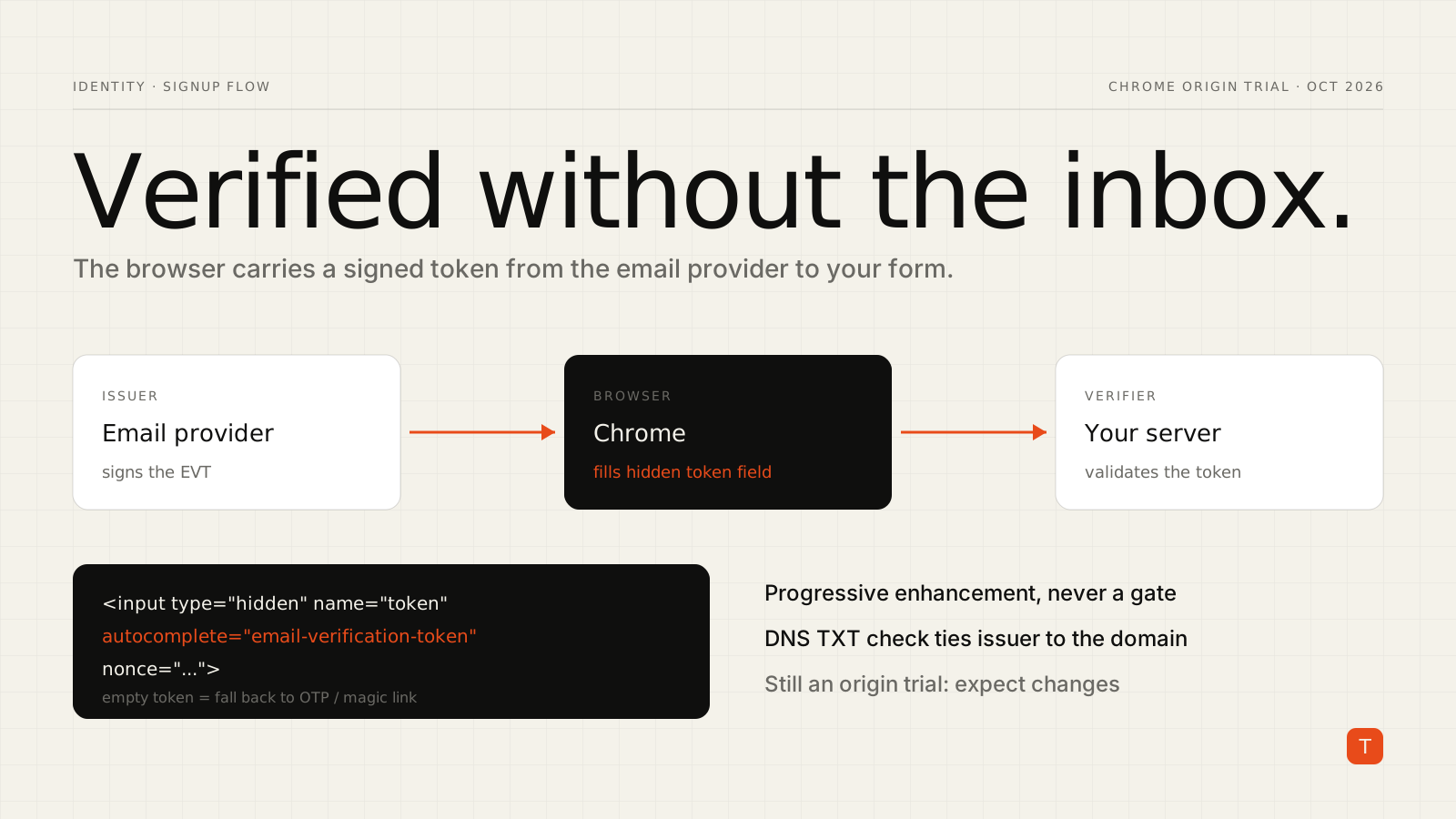
Chrome's Email Verification Protocol is an attempt to remove that detour. Instead of emailing the user, your page asks the browser, and the browser asks the user's email provider to vouch for the address. The Chrome team posted a fresh update on the origin trial on October 5, and it contains several backwards-incompatible changes, so anyone experimenting with it should read it carefully.
This is still an origin trial. Treat what follows as something to prototype, not something to ship to every user.
How the protocol works
There are two roles. A verifier is the site collecting an email address, which is probably you. An issuer is the email provider, which signs a short-lived proof called an Email Verification Token (EVT). The user needs to be signed in to their email provider in the browser for any of this to work.
On the verifier side, the integration starts in your form. You add the usual email field plus a hidden field that the browser fills with the token, per the verifier documentation:
<form method="post" action="/signup">
  <input type="email" name="email-address" autocomplete="email">
  <input
    type="hidden"
    name="token"
    autocomplete="email-verification-token"
    nonce="rAnD0m-VaLuE">
  <button>Continue</button>
</form>
The nonce must be a unique, session-bound value generated by your server. When the form is submitted, the hidden field is either empty or holds a token.
An empty field means the browser or provider does not support the API, or the user skipped verification. In that case you fall back to whatever you do today: a one-time code or a magic link. That fallback is the important design point. The feature is progressive enhancement, so it can only make the flow shorter for users who qualify, never block anyone else.
Validating the token on your server
A token present in the form is a claim, not a fact, until your server checks it. The documentation lays out a sequence of checks. The payload must show that email_verified is true, that email matches what the user submitted (compare case-insensitively), that aud matches your origin exactly with no path or trailing slash, that nonce matches the one in your form, and that iat and exp put the token inside its validity window.
Then comes the part that makes the protocol trustworthy: verifying that the issuer is actually allowed to speak for that email domain. You look up a DNS TXT record on the address's domain:
$ dig +short TXT _email-verification.gmail.com
"iss=accounts.google.com"
Prepend https:// to the iss value and confirm it matches the token's iss claim. Next, fetch https://<issuer>/.well-known/email-verification, which returns JSON including issuer, issuance_endpoint, jwks_uri and signing_alg_values_supported. The issuer field must match the token exactly. Finally, fetch the key set from jwks_uri and verify the signatures.
Chrome's sample uses the @sd-jwt/core and jose libraries, restricts accepted algorithms to Ed25519, EdDSA and ES256, and verifies two signatures: the issuer's signature on the EVT, and a key-binding JWT signed with the browser's key. The library call that ties it together looks like this:
const result = await sdJwt.verify(rawToken, {
  kb: {
    expectedNonce: sessionNonce,
    expectedAudience: "https://your-site.example",
    required: true,
  },
});
Replace the audience with your own origin; the sample on Chrome's page uses a placeholder. If every check passes, you can treat the address as verified. If any check fails, send a confirmation email through your normal flow.
What changed in the October update
The latest post lists a handful of changes that matter if you tried an earlier build of the trial.
The email claim is returned exactly as submitted. From Chrome 156, verifiers receive the address as the user typed it, not the provider's canonical form. If you already compare case-insensitively, nothing should break. For providers it is stricter: Chrome rejects tokens whose email does not match the submitted value exactly.
The Sec-Fetch-Dest value was renamed. Issuance requests carry this header. Chrome 153 sent emailverification; Chrome 154 and later send email-verification. If you run an issuance endpoint that checks the header, which Chrome recommends as a guard against CSRF and unintended request contexts, accept both during the rollout.
Optional kid. The key identifier may be absent from both the keys and the JWT. Gmail is the example given. When the token has no kid, iterate through the published keys until one verifies it, as the sample code above does.
Android support and third-party trials. Chrome 154 added Android support with no protocol changes, and the setting lives under Settings, Addresses and more, Verified Email. Also in Chrome 154, providers that ship an embedded script or identity SDK can register for a third-party origin trial token, so embedding sites do not need their own. The registrant must be same-site with the issuer.
Should you build on it now?
For most teams, not in production. It is an origin trial, the post itself says the changes were backwards-incompatible, and your users need a signed-in provider that participates. What you can do cheaply is prepare.
First, make sure your signup form already has a clean fallback path and that adding a hidden token field cannot break it. Second, generate a per-session nonce on the server; you will want that anyway. Third, if you handle email normalization anywhere, make sure the comparison against the submitted address is case-insensitive and does not depend on a provider's canonical form.
If signup conversion is a measurable problem for your product, a small prototype behind the trial token is worth an afternoon. Measure how often the token arrives, how often validation passes, and how much of the OTP traffic disappears. The Chrome team says it does not expect further breaking changes and is preparing to ship, so the numbers you collect now will tell you whether it is worth the engineering time when it does.
Takeaways
- Email Verification lets the browser carry a signed proof of the user's address to your form, replacing the inbox round trip for supported users.
- It is progressive enhancement: an empty token field means you run your existing OTP or magic-link flow.
- Server validation is the real work: payload checks, DNS delegation via the
_email-verificationTXT record, issuer metadata, and two signature verifications. - It is still an origin trial with recent breaking changes. Prototype, measure, and keep it off your critical path until it ships.
Sources: Email verification updates, October 2026 and the verifier integration guide, both from Chrome for Developers.