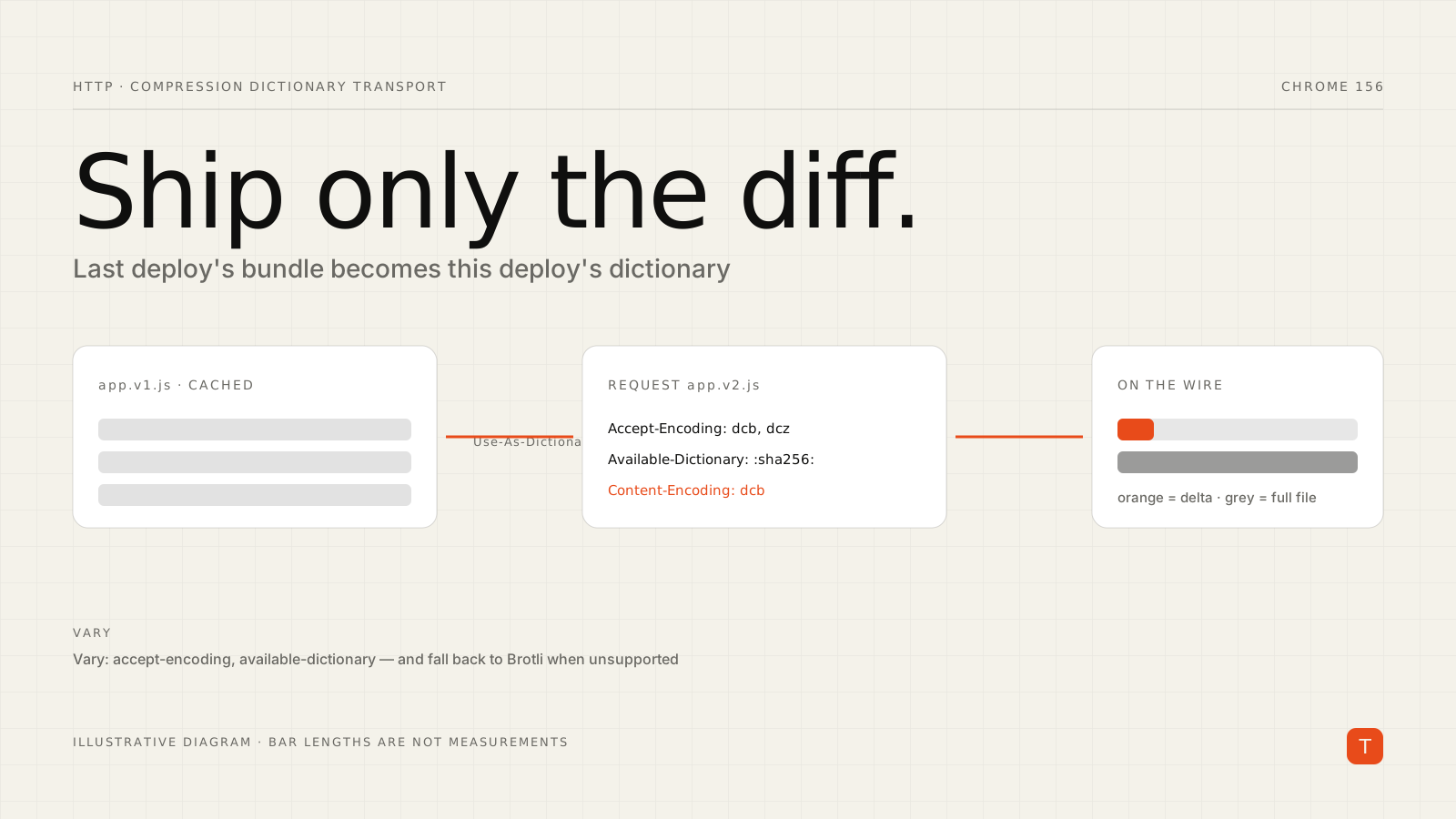
Every deploy has the same awkward economics. You change forty lines, your bundler emits a new hashed filename, and every returning visitor re-downloads the entire file, because from the cache's point of view it is a different resource. Brotli and gzip help, but they only compress a file against itself.
Compression Dictionary Transport (specified as RFC 9842) changes the arithmetic. It lets a response be compressed against a resource the browser already holds, such as the previous version of the same script. When most of the file is unchanged, most of the bytes never cross the wire.
Chrome shipped the feature in version 130, and Chrome 156, which is in beta and scheduled for stable on October 20, 2026, lists "Compression dictionary transport Updates". The notes describe changes to how rel=compression-dictionary links are fetched: request destination, mode, credentials, and referrer handling. That is a good prompt to look at the mechanism again, and at whether your stack could use it.
How the handshake works
There are three moving parts, all plain HTTP.
First, a response declares itself reusable as a dictionary with the Use-As-Dictionary header. The match value is a URL pattern describing which future requests may use it:
Use-As-Dictionary: match="/js/app.*.js", id="dictionary-12345"
Second, when the browser later requests a URL matching that pattern, it advertises the dictionary it holds and the new encodings it accepts:
Accept-Encoding: gzip, br, zstd, dcb, dcz
Available-Dictionary: :pZGm1Av0IEBKARczz7exkNYsZb8LzaMrV7J32a2fFG4=:
Dictionary-ID: "dictionary-12345"
Available-Dictionary carries the SHA-256 hash of the stored dictionary. MDN is explicit that the server must check this hash; the optional Dictionary-ID is extra information and does not replace it.
Third, the server answers with Content-Encoding: dcb (dictionary-compressed Brotli) or dcz (dictionary-compressed Zstandard). The new bundle arrives as a diff against the old one, and the browser reconstructs it.
If the response is cacheable, it must carry the right Vary header so shared caches do not hand a dictionary-compressed body to a client that cannot decode it:
Vary: accept-encoding, available-dictionary
Two ways to get a dictionary
The first and most natural option is delta updates for static assets. Serve app.v1.js with a Use-As-Dictionary header whose match covers future versions, and the browser will offer it as the dictionary when it requests app.v2.js. No extra download is needed because the dictionary is a file the user already fetched.
The second option is a standalone dictionary, useful for content like HTML where there is no single previous version to diff against. You point at it from your markup or a header, and the browser fetches it during idle time:
<link rel="compression-dictionary" href="/dictionary.dat">
The dictionary response must itself include Use-As-Dictionary. This second path is the one the Chrome 156 fetch-behavior changes touch, so if you already use it, retest after the update lands.
What gains to expect
Treat vendor numbers with care. A Web Performance Calendar write-up reports responses "anywhere from 60-90+% smaller" than the best non-dictionary compression, but it gives ranges rather than per-site measurements, and the gain depends entirely on how similar the new file is to the old one. A release that touches a handful of modules compresses well. A release that reshuffles chunk boundaries or changes a framework version may not. Measure your own deploy-to-deploy diffs before promising anything.
The constraints that bite
MDN lists the restrictions, and several of them shape the design:
- Dictionaries must be same-origin with the resource using them. A CDN on a different hostname from your pages needs CORS configured, with the
crossoriginattribute on the request. - Dictionaries are not shared across origins, even when two sites download identical files.
- Freshness matters. A dictionary served with
no-storeorno-cacheis never used. HTML documents are often sent withno-cacheormax-age=0, must-revalidate, so the browser silently drops them as dictionaries. Chrome's Issues panel reports this as "The response can't be used as a dictionary because its freshness is expired." - Browsers may disable the feature when cookies are blocked or other privacy protections are on, because dictionaries could be abused for tracking.
- If you use a Content-Security-Policy, the dictionary location must be allowed by
connect-src(ordefault-srcifconnect-srcis unset). - MDN marks the feature experimental and not Baseline, so it is progressive enhancement only. Clients without support simply keep receiving ordinary Brotli or gzip.
On the server side, the same write-up gives a sensible warning: never trust the client. Arbitrary Dictionary-ID values should map to an allowed pattern or a known list, and dictionaries should be immutable at permanent URLs.
Building the compressed files yourself
If you want to understand the format, MDN shows the manual recipe for Brotli. The output must begin with a magic header and the dictionary's SHA-256 hash, followed by the compressed stream:
echo -en '\xffDCB' > data.txt.dcb && \
openssl dgst -sha256 -binary dictionary.txt >> data.txt.dcb && \
brotli --stdout -D dictionary.txt data.txt >> data.txt.dcb
In practice you would not do this by hand per deploy. Compute diffs at build time or at the edge, and cache the result keyed by the dictionary hash and URL. The perf write-up above describes doing this in a Cloudflare Worker so the origin application stays untouched, falling back to the original response if any step fails.
Practical takeaways
- Start with one high-churn, high-weight asset, usually your main application bundle, and keep everything else on plain Brotli.
- Make sure versioned filenames are matchable by a single URL pattern, such as
/js/app.*.js. - Send
Vary: accept-encoding, available-dictionaryon every cacheable response that may be dictionary-compressed. - Verify with DevTools that requests carry
Available-Dictionaryand responses showdcbordcz. - Measure transfer size on returning-visitor loads across several real deploys, not one best case.
- If you rely on
rel=compression-dictionarylinks, retest on Chrome 156 beta before stable lands.
Because unsupported clients fall back cleanly, the risk is mostly operational: cache keys, build steps, and edge logic. For sites that ship often and have many returning users, that is a trade worth evaluating.
Sources: MDN, Compression Dictionary Transport; Chrome 156 release notes, Chrome Platform Status; Web Performance Calendar, Getting real small with compression dictionaries.