A Core Web Vitals report that says "LCP: 3.4 s, needs improvement" is a smoke alarm, not a diagnosis. It tells you something is wrong and nothing about where. Teams then spend a sprint compressing images when the real delay was the server, or rewriting event handlers when the page was simply busy before the click arrived.
On October 13, 2026, Cloudflare added sub-part breakdowns to Web Analytics' Real User Monitoring. LCP and INP are now split into their phases, using data from real visitors, and the connection time is split into TCP and TLS. If your site already sits behind Cloudflare, you can start answering "which phase is slow?" without adding another script.
What is now measured
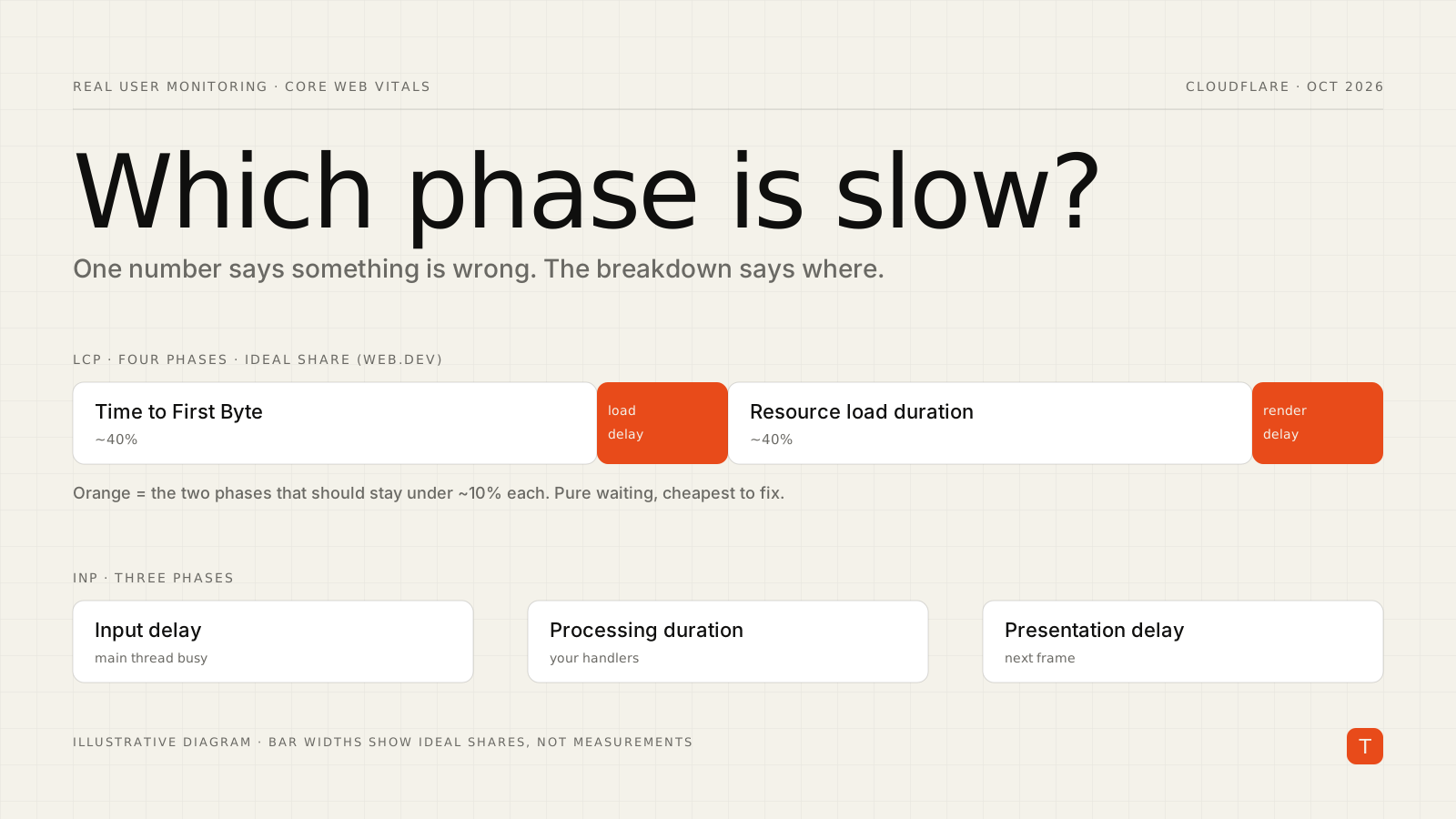
For Largest Contentful Paint, the changelog lists four phases, each exposed as a field in the GraphQL Analytics API:
- Time to First Byte (
timeToFirstByte): how long the browser waits for the HTML document. - Resource load delay (
lcpResourceLoadDelay): the time until the browser discovers the LCP resource after the document starts arriving. - Resource load duration (
lcpResourceLoadTime): how long that resource takes to download. - Element render delay (
lcpElementRenderDelay): the gap between the resource arriving and the element appearing on screen.
For Interaction to Next Paint, there are three:
- Input delay (
inpInputDelay): the time an interaction is blocked before processing starts. - Processing duration (
inpProcessingDuration): how long event handlers run. - Presentation delay (
inpPresentationDelay): the time to render the next frame after the handlers finish.
Connection time now also comes as connectionTimeWithoutTLS and tlsTime, while the combined connectionTime field stays in the API. In the dashboard, the LCP and INP phases sit in the Core Web Vitals section of the Real User Monitoring report, and the connection split is under Page Load. In GraphQL, the phases appear as percentile fields on rumWebVitalsEventsAdaptiveGroups (for example lcpResourceLoadDelayP50), and the connection split on rumPerformanceEventsAdaptiveGroups. Available percentiles run from P25 up to P999, and two details matter when you consume the data: values are in microseconds, and a negative value means the data is not available. The changelog does not say which plans include the feature, so check your own dashboard.
Reading the LCP breakdown
The phases are not equally weighted. web.dev's LCP optimization guide gives a rough ideal split: about 40% of the LCP time in TTFB, under 10% in resource load delay, about 40% in resource load duration, and under 10% in element render delay. The two "delay" phases are pure waste, because nothing is being fetched or painted during them. If either one is a large share of your total, that is almost always the cheapest win.
The same guide maps each phase to a fix:
- High TTFB: minimize redirects, serve cacheable HTML from a CDN edge, avoid cache-busting URL parameters, and speed up the origin.
- High resource load delay: make the LCP resource discoverable in the initial HTML, preload it with high fetch priority, and never lazy-load the LCP image.
- High resource load duration: shrink the file with modern formats, compression and correct sizing, and cache it well.
- High element render delay: reduce or inline render-blocking CSS, avoid synchronous scripts in the head, and break up long tasks.
A typical misdiagnosis: a product page with a hero image and a 3.4 s LCP. The instinct is "optimize the image". The breakdown shows the image downloads quickly but starts late, because the hero is set as a CSS background or injected by client-side JavaScript, so the browser finds it only after scripts run. The fix is one line of markup, not a new image pipeline:
<img
  src="/hero.avif"
  width="1200" height="630"
  fetchpriority="high"
  alt="Product overview">
That is the point of the breakdown: it turns a hunch into a ranked list.
Reading the INP breakdown
INP is measured at the 75th percentile, and per web.dev a good score is 200 ms or less, with anything above 500 ms rated poor. The three phases tell you which part of the main thread story you are in:
- Input delay dominates: the main thread was busy when the user clicked. Long tasks from startup scripts, third-party tags or hydration are the usual suspects. Splitting work and deferring non-critical scripts helps here, and your handlers are innocent.
- Processing duration dominates: your own event handlers are slow. This is where you profile the handler, move work off the critical path, or yield before doing non-urgent updates.
- Presentation delay dominates: the handler finished quickly, but producing the next frame was expensive. Large DOM updates, heavy layout and style recalculation, and big re-renders are the likely causes.
Notice how differently these are fixed. Optimizing handlers will not move a score that is dominated by input delay.
A small triage helper
If you pull the percentile fields through the GraphQL API, a few lines of TypeScript turn the numbers into a verdict. This sketch assumes you have already fetched the P75 values (the same field names with a P75 suffix, per the percentile list above) and uses the ideal shares from the LCP guide:
// Cloudflare reports sub-parts in microseconds; negative means "no data".
type LcpParts = {
  ttfb: number;
  loadDelay: number;
  loadTime: number;
  renderDelay: number;
};

export function diagnoseLcp(p: LcpParts): string {
  const parts = Object.entries(p);
  if (parts.some(([, v]) => v < 0)) return "Incomplete data";

  const total = parts.reduce((sum, [, v]) => sum + v, 0);
  const share = (v: number) => v / total;

  if (share(p.loadDelay) > 0.1) return "Resource discovered late: preload or inline it";
  if (share(p.renderDelay) > 0.1) return "Render blocked: check CSS, sync scripts, long tasks";
  if (share(p.ttfb) > 0.4) return "Slow server response: cache HTML at the edge";
  if (share(p.loadTime) > 0.4) return "Heavy resource: shrink or reformat it";
  return "Balanced: no single phase stands out";
}
The order is deliberate: the two delay phases are checked first because they are the cheapest to fix. One caveat worth stating: summing per-phase percentiles is an approximation, since the p75 of each phase is not the phase breakdown of the p75 visit. Use it for triage, then confirm in lab tools or on individual sessions.
What to do this week
- Open the Core Web Vitals section of your Cloudflare RUM report and note which phase is largest for LCP and INP, on mobile and desktop separately.
- Fix the delay phases first. Resource load delay and element render delay should be small, and when they are not, the fixes are usually markup and CSS changes.
- Only then optimize the heavy phases: edge caching for TTFB, formats and sizing for load duration, handler profiling for processing duration.
- Re-check after each change. Because the data comes from real users, expect a lag before a fix is visible in percentiles.
A single aggregate number invites expensive guesses. A phase breakdown makes the next step obvious, and for most sites the next step is smaller than expected.