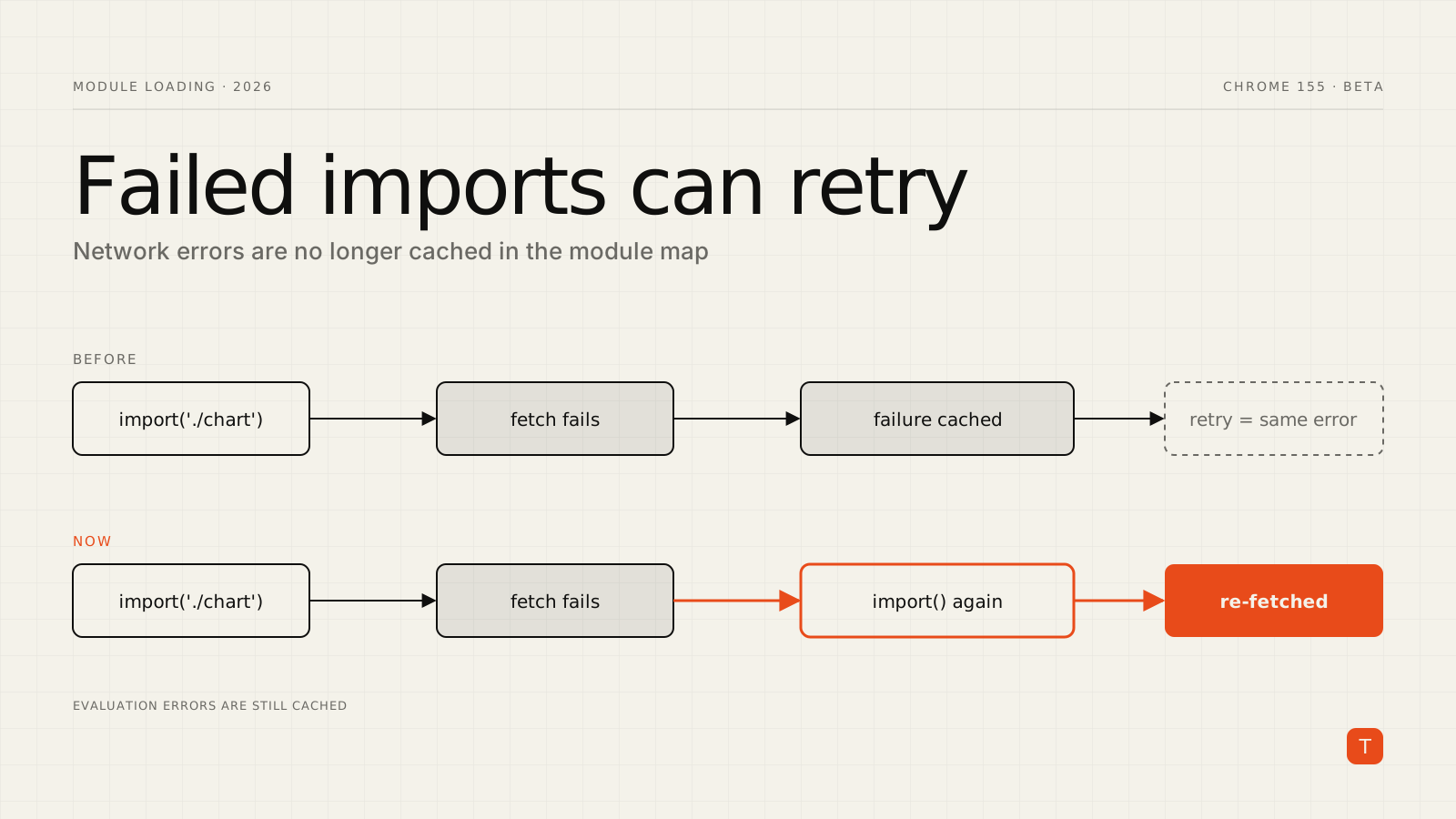
If you ship a modern JavaScript app, you almost certainly rely on import() for code splitting: the checkout flow, the chart library, the rich-text editor, the admin panel. Each of those is a separate network request that can fail. And until recently, when one failed, the browser remembered the failure. Calling import() again on the same specifier didn't hit the network. It handed back the same rejected promise.
Chrome is changing that. The Chrome 155 beta release notes (published September 16, 2026) list "Avoid caching module failures": failed module loads can now be retried by calling import() again, which the notes describe as a fix for real developer and user pain over unstable networks. Here is what changed, what did not, and how to write retry logic that actually helps.
The problem: failures were sticky
Browsers keep a per-page "module map" so that a module is fetched and evaluated once, no matter how many places import it. Historically, that map also stored failed fetches. The HTML spec change behind this work (whatwg/html#10327) frames the tradeoff directly: the old behavior favored determinism, and the new one favors availability. A transient network blip could permanently break a module for the life of the page, even after connectivity came back.
For users this looked like a button that did nothing, a route that rendered blank, or an error boundary triggered by Failed to fetch dynamically imported module. The usual workaround was ugly: append a cache-busting query string to the specifier, or force a full page reload and lose the user's in-page state.
What changed, precisely
According to the spec change, the following are no longer cached in the module map:
- network errors during the module fetch
- HTTP error responses
- MIME type mismatches
A later import of the same specifier, whether from import(), a dynamically inserted <script type="module">, or a static import in one of those, re-fetches the module if the previous fetch failed. Concurrent imports of the same module are still deduplicated, so if several callers await one in-flight fetch and it fails, they all reject together. Only later attempts trigger a new request.
Two important limits. First, evaluation errors are still cached. If the module downloaded fine but threw while executing, retrying will not re-run it. Second, this is a fetch-level fix; it does not decide whether retrying is a good idea in your situation. That part is on you.
On browser support, the blink-dev Intent to Ship states that the change aligns Chrome with what Gecko and WebKit have already shipped, and it references Chrome milestone 154 for the rollout, while the release notes above list it under 155 beta. Either way, treat the behavior as something to verify in the browsers you support rather than assume.
A retry wrapper worth shipping
The simplest useful pattern is a small helper that wraps a loader function and retries with exponential backoff:
async function importWithRetry<T>(
  loader: () => Promise<T>,
  retries = 3,
  baseDelayMs = 500
): Promise<T> {
  let lastError: unknown;
  for (let attempt = 0; attempt <= retries; attempt++) {
    try {
      return await loader();
    } catch (err) {
      lastError = err;
      if (attempt === retries) break;
      // 500ms, 1s, 2s ...
      await new Promise((r) => setTimeout(r, baseDelayMs * 2 ** attempt));
    }
  }
  throw lastError;
}
Use it anywhere you would normally call import() directly. With React, for example:
import { lazy } from "react";

const RevenueChart = lazy(() =>
  importWithRetry(() => import("./RevenueChart"))
);
Note that the loader is a function returning import(...), not an already-created promise. Retrying a promise that has already rejected does nothing; you have to call import() again so the browser gets a chance to re-fetch.
Where retries will not save you
Retry logic is not a cure-all, and a few failure modes deserve separate handling:
- Stale deployments. The most common cause of chunk load errors in production is a user holding an old page while you deploy new hashed filenames. The old chunks are gone, so every retry returns a 404. Here the right response is to detect the failure after your retries are exhausted and prompt for a reload, or to keep old assets available for a while after each deploy.
- Bundler runtime caches. Your bundler may add its own loading layer on top of native
import(). Test the retry path against your actual build output instead of assuming the browser behavior is all that matters. - Older browsers. Where a browser still caches the failure, your wrapper will retry and fail identically each time. Keep the fallback (a reload prompt) in place.
- Non-network errors. A module that throws during evaluation will fail on every attempt. Distinguish fetch failures from evaluation failures in your error reporting if you can, so you don't retry something that can't succeed.
Make it observable
A retry that silently succeeds is easy to forget, and it hides a real signal: your users are losing requests. Log the first failure separately from the final outcome, with the specifier and attempt number, to whatever monitoring you already use. If retry rates climb after a release, that usually points at asset delivery (CDN, cache headers, deployment ordering) rather than at user networks.
It also pairs well with performance work. Lazy loading is one of the standard ways to cut initial JavaScript, but every split point you add is one more request that can fail. Recoverable imports make aggressive splitting safer, which in turn helps metrics like INP and LCP on lower-end devices and slower connections.
Takeaways
- Audit your dynamic imports. Find every
import()on a user-critical path and decide what should happen when it fails. - Wrap loaders in a retry helper with a small, bounded number of attempts and backoff. Pass a function, not a promise.
- Keep a last-resort path. After retries fail, show a clear message and offer a reload rather than a blank screen, especially after deployments.
- Log retries so you can see network and delivery problems that users would otherwise experience silently.
- Test in the browsers you support, including throttled and offline scenarios in DevTools, since behavior and rollout timing vary by browser and version.
A small change in the module loader spec removes one of the more frustrating failure modes of code splitting. It costs very little to take advantage of it, and it makes your lazy-loaded features noticeably more resilient.