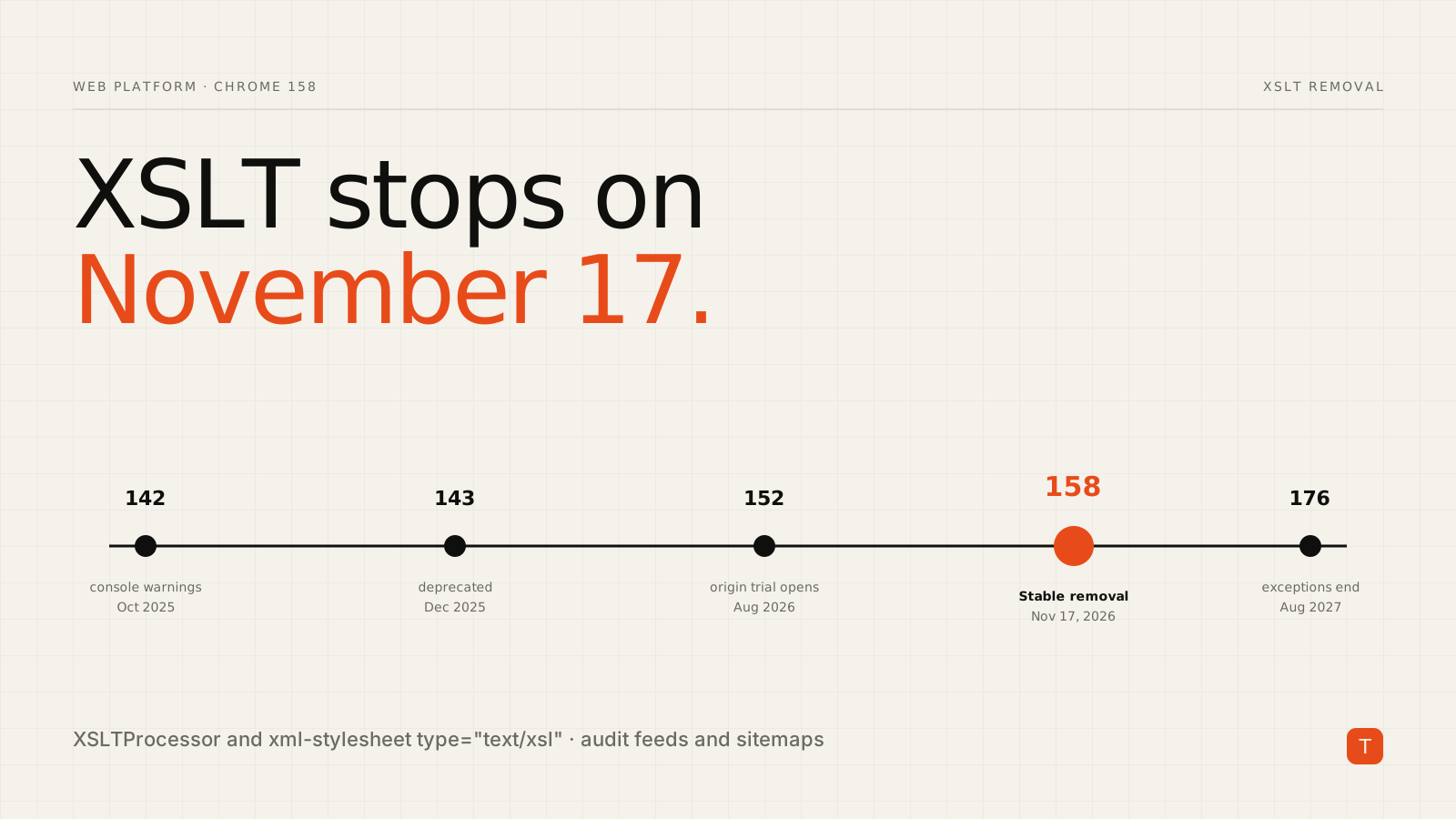
On November 17, 2026, Chrome 158 reaches Stable and, according to Chrome for Developers, XSLT stops working in the browser. That covers two things: the XSLTProcessor JavaScript class, and the <?xml-stylesheet type="text/xsl" ...?> processing instruction that browsers use to turn raw XML into a readable page.
For most product sites this is a non-event. For a surprising number of sites it is a silent regression: the pretty XML sitemap becomes a wall of raw text, the styled RSS feed stops rendering, and an old internal report tool throws a ReferenceError. Nothing in your analytics will tell you. This post covers what exactly changes, how to find it, and how to fix it.
What is changing, and when
The removal has been telegraphed for a year. Per Chrome's timeline, console warnings began in Chrome 142 (October 28, 2025), official deprecation landed in Chrome 143 (December 2, 2025), an enterprise policy for testing arrived in Chrome 146, and an origin trial opened in Chrome 152 (August 25, 2026). Stable removal is Chrome 158 on November 17, 2026.
There is one reprieve. Sites enrolled in the origin trial, and organizations using the XSLTEnabled enterprise policy, keep XSLT until Chrome 176 (August 17, 2027), after which it is disabled for everyone. Treat that as a deadline extension, not a fix.
Two things are explicitly not affected. XML itself keeps working, and so does the CSS flavour of the processing instruction (type="text/css"). Server-side XSLT, such as xsltproc, PHP's ext-xsl or Saxon on your backend, is also untouched because it never ran in the browser.
What actually breaks
Think of anything where the browser, not your server, performs the transformation:
- Styled XML sitemaps and feeds. Many CMS plugins ship an XSL stylesheet so humans can view
sitemap.xmlorfeed.xmlas a table. After the removal, users see raw XML or a tree view. Search crawlers and feed readers parse the XML data directly, so they are not the audience at risk, but the human-facing page is. - Client-side
XSLTProcessorcode. Calls likenew XSLTProcessor()fail once the class is gone. This often hides in vendored libraries and old admin dashboards. - XML-plus-XSL documents. Reports, invoices or exports that rely on the browser to render them.
If you ship a sitemap with a decorative stylesheet, the sitemap still works for Google. What you lose is the human view. That is worth knowing before you spend a week on it.
Step 1: Find it in an afternoon
Start with the cheapest check, which is what your served XML actually contains:
curl -s https://example.com/sitemap.xml | grep -i "xml-stylesheet"
curl -s https://example.com/feed.xml    | grep -i "xml-stylesheet"
If the match points to an .xsl file, you are affected. Next, search your source and build output, including node_modules, for the code-level signals:
grep -rEl "XSLTProcessor|importStylesheet|transformToDocument|xml-stylesheet" src public dist
Then let the browser tell you. Chrome reports XSLT usage as a deprecation, so a ReportingObserver can catch it in real user sessions:
new ReportingObserver((reports) => {
  for (const r of reports) {
    if (r.body && r.body.id === 'XSLT') {
      console.warn('XSLT used on', r.url);
      // navigator.sendBeacon('/api/deprecations', JSON.stringify({ url: r.url }));
    }
  }
}, { types: ['deprecation'], buffered: true }).observe();
Chrome's guidance also points enterprise admins to the Legacy Technology Report. Finally, test the real behaviour: Chrome Canary, Dev and Beta already disable XSLT by default, so open your feed and sitemap URLs there. One secondary write-up also describes a chrome://flags/#xslt toggle and a --disable-features=XSLT switch for testing; check that your build exposes it before relying on it.
Step 2: Pick a fix
Chrome's migration guidance gives you several options. In practice they reduce to four.
1. Swap the XSL for CSS. For sitemaps and simple feeds this is the lowest-effort route. Replace the XSL processing instruction with a CSS one and style the elements directly:
<?xml version="1.0" encoding="UTF-8"?>
<?xml-stylesheet type="text/css" href="/sitemap.css"?>
<urlset xmlns="http://www.sitemaps.org/schemas/sitemap/0.9">
urlset { display: block; font-family: system-ui, sans-serif; padding: 2rem; }
url    { display: block; padding: .5rem 0; border-bottom: 1px solid #ddd; }
loc    { display: block; }
lastmod { display: block; color: #666; font-size: .875rem; }
XML has no default layout, so you must set display yourself, and CSS cannot turn a URL into a clickable link or build a real table. For a sitemap nobody reads, that is fine.
2. Drop the stylesheet and point people to HTML. For RSS and Atom, the cleaner pattern is to advertise the feed from your HTML pages instead of asking humans to open raw XML:
<link rel="alternate" type="application/rss+xml" title="Blog feed" href="/feed.xml">
Then link a normal HTML "Subscribe" page. Feed readers discover the XML through the link tag.
3. Transform on the server or at build time. If the XSLT logic is real business logic, move it where it already runs well:
xsltproc report.xsl report.xml > report.html
Saxon, lxml.etree.XSLT in Python, or your framework's build step all work. Note that browsers implemented XSLT 1.0, so if you move to Saxon's XSLT 3.0 engine, expect to adjust a few stylesheets. For new work, serving JSON and rendering it with ordinary JavaScript is the other route Chrome's docs recommend.
4. Keep it client-side with a polyfill. Chrome's page lists a WebAssembly-based replacement for XSLTProcessor, Saxonica's JavaScript implementation for XSLT 3.0, and a Chrome extension for raw XML pages you cannot change. Use this when rewriting is not affordable, but pin versions, review what you load, and test against your real stylesheets. One practitioner reported that a polyfill failed on a stylesheet that used includes until it was flattened, so do not assume drop-in compatibility.
Don't forget the other browsers
Chrome is not the only engine heading this way. Coverage of the change notes that Firefox, Safari and Edge have signalled intent to remove XSLT, though firm ship dates were not confirmed in the sources we reviewed. Whatever you build now should not depend on any browser doing XSLT for you.
What to do this week
- Run the two
curlchecks against every sitemap, feed and XML endpoint you own, including those generated by plugins. - Grep source and build output for
XSLTProcessorandxml-stylesheet, including vendored code. - Deploy the
ReportingObserversnippet to find usage you cannot grep for. - Choose a fix per asset: CSS for sitemaps, a
link rel="alternate"plus HTML page for feeds, server-side transforms for real logic. - If you truly need more time, enrol in the origin trial, but put a calendar reminder at August 2027.
The removal is deliberately boring, which is exactly why it gets missed. An hour of checking before November 17 is cheaper than discovering broken pages from a customer.
Sources
- Removing XSLT for a more secure browser, Chrome for Developers
- Chrome 158 Drops XSLT on 17 November: Fix RSS and Sitemaps, DEV Community
- Chrome Removes XSLT: What Breaks and How to Detect It